How to Introduce Prompt Engineering to Students
How to Introduce Prompt Engineering to Students
Teaching students how to interact effectively with AI is becoming essential as technology shapes the future. Prompt engineering, or crafting clear instructions for AI tools, helps students build critical thinking, communication, and digital literacy skills that are valuable across all subjects and career paths. Here's a quick overview of the key points:
- What is Prompt Engineering? It’s the process of creating precise instructions to guide AI systems like ChatGPT for meaningful outputs. Think of it as “programming with words.”
- Why Teach It? It equips students with skills for an AI-driven world, encourages problem-solving, and enhances learning in areas like science, writing, and art.
- How to Teach It? Start with structured methods like acronyms (e.g., PREP: Prompt, Role, Explicit instructions, Parameters) and strategies like zero-shot, few-shot, and chain-of-thought prompting.
- Classroom Activities: Use role-playing, bell-ringers, and tools like Twin Pics for hands-on practice. Adjust complexity for different grade levels.
- Responsible AI Use: Teach students to verify AI outputs, identify bias, and protect privacy.
Prompt engineering isn’t just for tech - it’s a skill for every subject, preparing students to lead in an AI-integrated future.
Master Prompt Engineering for Beginners! (7 Essential Tips)
sbb-itb-97b6c2e
Core Concepts to Teach Students About Prompt Engineering
Parts of an Effective AI Prompt: A Student Guide
Teaching students how to craft effective prompts is essential for guiding AI to produce meaningful and accurate results. A clear framework can help them navigate AI interactions with confidence.
Parts of an Effective Prompt
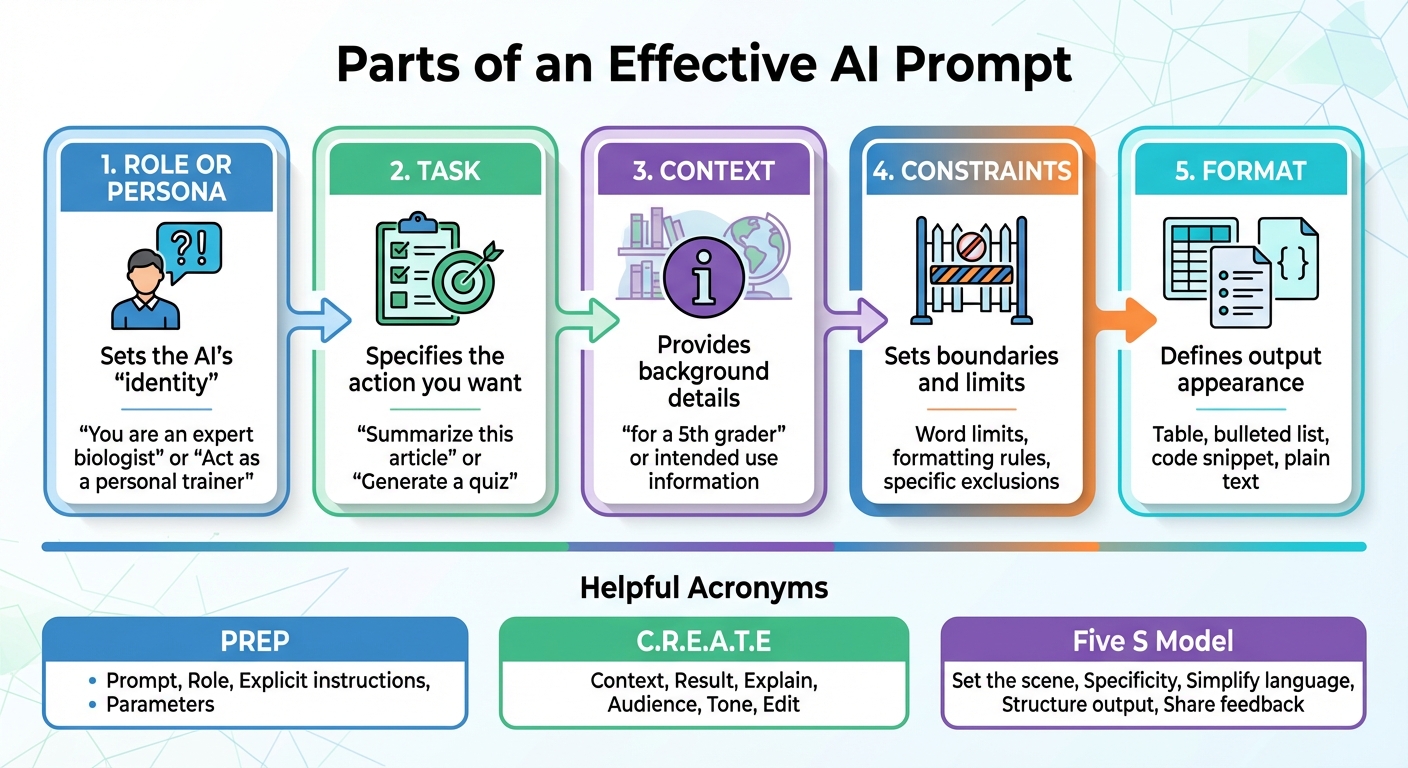
An effective prompt isn't just a question - it's a structured guide that directs the AI toward the desired outcome. The key components include:
- Role or Persona: This sets the AI's "identity." For example, prompts like "You are an expert biologist" or "Act as a personal trainer" influence the tone and expertise of the response.
- Task: This specifies the action you want the AI to perform, such as "Summarize this article" or "Generate a quiz."
- Context: Providing background details, such as the audience ("for a 5th grader") or intended use, ensures the output is relevant.
- Constraints: These are boundaries like word limits, formatting rules, or specific exclusions to keep the response focused.
- Format: This defines how the output should look - whether as a table, bulleted list, code snippet, or plain text.
To make these concepts easier to remember, educators can introduce acronyms like PREP (Prompt, Role, Explicit instructions, and Parameters), C.R.E.A.T.E (Context, Result, Explain, Audience, Tone, and Edit), or the Five S Model (Set the scene, Specificity, Simplify language, Structure output, and Share feedback). These tools act as checklists, helping students approach prompt creation systematically.
Prompt Strategies for Better AI Results
Once students grasp the basics of prompt structure, they can experiment with strategies to refine AI responses:
- Zero-shot prompting: This involves asking the AI a question without providing any examples. It's useful for straightforward queries or general information.
- Few-shot prompting: Here, students provide two or more examples to establish a pattern. For instance, if they want summaries in a specific style, they can show examples first and then request a similar output.
- Chain of Thought (CoT) prompting: This strategy encourages the AI to explain its reasoning step by step. It's particularly helpful for solving math or logic problems, where students might say, "Think step by step and explain your work."
- Iterative prompting: Treating the interaction as a conversation, students can refine the AI's output by adding follow-up instructions like "make it more engaging" or "simplify this for a younger audience."
These strategies encourage students to see prompt engineering as a dynamic process, where adjustments and experimentation lead to better results.
Teaching Students to Use AI Responsibly
While AI can be a powerful tool, it comes with its own set of challenges. One major issue is AI hallucination, where the tool generates content that sounds credible but is factually incorrect. Students need to verify any claims, citations, or statistics the AI provides by cross-checking with reliable sources. As Tim Mousel, M.S., Founder of Evolve AI Institute, puts it:
"AI can generate plausible-sounding information that is factually wrong. Always verify claims, citations, and statistics before using AI output in your teaching."
Another concern is bias. Since AI systems are trained on vast datasets, they can unintentionally reflect societal stereotypes. Encourage students to critically evaluate AI outputs by asking questions like: Does this response favor one group over another? What perspectives might be missing? This helps them identify and address bias in their work.
Privacy is also crucial. Students should avoid sharing personal or sensitive information with AI tools. A practical workaround is using the "skeleton" method: have the AI generate an outline with placeholders, and then fill in the specifics themselves. This ensures they retain control over personal details while benefiting from AI's organizational capabilities.
Finally, students should adopt a "human-in-the-loop" mindset. AI should be treated as a collaborator, not a substitute for their own thinking. By refining and building on AI-generated content, students can create work that truly reflects their ideas and understanding.
Classroom Activities for Teaching Text-Based Prompt Engineering
Modeling and Guided Practice
A great way to start is by showing students how to improve prompts step by step. The "Okay, Good, Great" method is a simple yet effective tool for this. For instance, take a vague prompt like "Explain photosynthesis" (Okay), then refine it to "Explain photosynthesis for 5th graders" (Good). Finally, make it even more specific: "Explain photosynthesis for 5th graders using a bulleted list with simple vocabulary and real-world examples" (Great). This progression demonstrates how adding context, audience, and structure can significantly improve the quality of the output.
Another fun way to teach this is through role-playing. For example, Joseph Polito had his 7th-grade students work in groups with assigned roles to predict AI outputs. One group, acting as scientists, focused on facts like mammals and life expectancy. Another group, as pet shop owners, emphasized emotional benefits like companionship. When tasked with imagining how a "police officer" role would change the AI's response, students correctly predicted that the focus would shift to safety and protection. Testing their predictions with an AI tool, they saw how role-based parameters influenced the output.
These exercises set the stage for interactive activities, helping students experiment with and refine their prompt strategies.
Interactive Activities for Student Engagement
Once students grasp the basics, quick and interactive exercises can keep them engaged. Bell-ringers and station rotations work particularly well for practicing zero-shot, few-shot, and chain-of-thought prompting.
- Bell-ringers: Start class with a short task, like having students classify a statement (e.g., as happy, sad, or neutral) using few-shot prompting. They might provide two examples for the AI before asking it to classify a third.
- Exit tickets: Wrap up lessons by asking students to refine a generic prompt. For example, they can add a role, audience, and format requirements to make it more specific.
Station rotations offer another hands-on approach. Set up stations focusing on different prompting techniques:
- One station might have students practice zero-shot prompting by asking direct questions.
- Another could focus on few-shot prompting, where students provide examples to guide the AI.
- A third might explore chain-of-thought prompting, such as solving math problems by asking the AI to explain its reasoning step by step.
These activities let students see how different strategies affect the AI's responses, all while keeping the classroom dynamic and engaging.
Adapting Activities for Different Grade Levels
To make these exercises work for various age groups, adjust the complexity of the tasks.
- Younger students: Provide sentence starters or templates. For example: "You are a [role]. Please [task] for [audience] using [format]." This structure helps guide their thinking while keeping things simple.
- Middle schoolers: Introduce frameworks like PREP (Prompt, Role, Explicit instructions, Parameters) to help them create more detailed prompts.
- High schoolers: Challenge them with prompt chaining. For instance, they can break a larger project into smaller, connected prompts, where the output of one step feeds into the next.
For English learners, encourage them to include accessibility instructions in their prompts. Suggestions like "Use simple vocabulary" or "Provide steps with checkboxes" make AI outputs easier to understand while teaching students how to advocate for their learning needs. Advanced students can take it a step further by evaluating AI outputs for potential inaccuracies or biases, turning the activity into a critical thinking exercise.
These tailored approaches ensure that students at all levels can build their skills while staying engaged and challenged.
Teaching Visual Prompt Engineering with Twin Pics
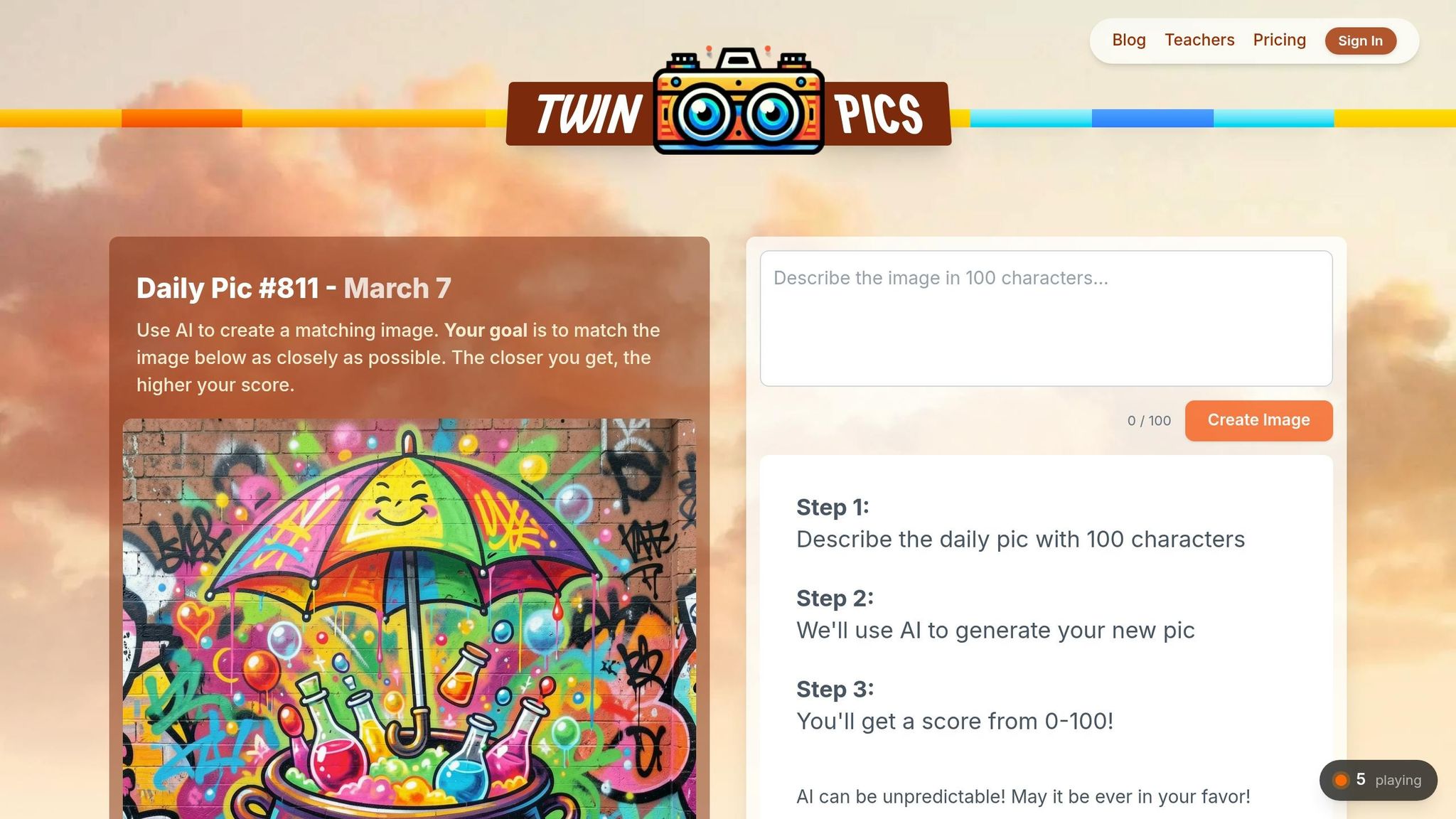
Twin Pics takes the concepts of text-based prompt engineering and applies them to visuals, helping students sharpen their observation and descriptive skills.
How Twin Pics Works in the Classroom
Twin Pics is a daily AI image game where students write detailed prompts to recreate a specific target image. The platform provides instant feedback with a similarity score (ranging from 0–100%) that shows how closely the AI-generated image matches the original [21,23]. Challenges refresh every 30 minutes, giving students frequent chances to practice crafting precise prompts.
Teachers can create classrooms using unique join codes, and students don’t need individual accounts. If devices are limited, the target image can be displayed on a shared screen, allowing the class to work together on a concise, 100-character prompt. This activity fits perfectly as a quick five-minute exercise or as part of a longer lesson focused on descriptive writing and precision [22,23].
Since the platform doesn’t save prompts after generating an image, students should copy their text before submitting. Teachers can also use the leaderboard and similarity scores to encourage friendly competition, making the activity more engaging [21,22].
Skills Students Develop Through Twin Pics
Twin Pics goes beyond just writing prompts - it helps students develop critical visual literacy. The character limit, typically between 100 and 200 characters depending on the plan [21,22], forces students to carefully choose their words. As Lidia, an educator from The Art of Inquiry, explained after using the tool with 11-year-olds in 2024:
"Students learn quickly that adjectives matter, specificity matters, and that 'the cat on the left' is not nearly descriptive enough when there are two cats on the left in the image".
Lidia herself achieved a 98% accuracy score through multiple refinements.
In another example, a Creative Writing teacher named Samantha introduced Twin Pics to her class in March 2025. She turned it into a friendly competition, where her personal high score was 85%, and the top student reached 82%. She shared:
"It's a fun way to practice descriptive writing, pushing students to be both vivid and precise in their word choices".
Through this process, students learn to observe details like perspective, lighting, and composition, then translate those elements into concise descriptions. They also expand their vocabulary, using precise adjectives and technical terms related to color, structure, and other visual elements [23,26].
Using Twin Pics Free and Pro Plans
Twin Pics offers two plans to fit different classroom needs. The Free plan includes daily challenges, a global leaderboard, and supports one classroom with unlimited students - perfect for trying out the platform. The Pro plan, priced at $12.00 per month, provides unlimited classrooms, priority support, and the ability to cancel anytime. Schools can also opt for a Group subscription at approximately $20.00 per year, which allows unlimited attempts and skips generation queues.
Both plans are COPPA-compliant, work on any device, and are designed for grades 4–12. Teachers can start with the Free plan to test the platform’s impact and upgrade to the Pro plan for managing multiple classes or ensuring faster image generation during busy periods. These features make Twin Pics a valuable tool for improving descriptive writing and building AI literacy in the classroom.
Assessing and Extending Students' Prompt Engineering Skills
Formative Assessment Techniques
When assessing students' prompt engineering abilities, focus on three essential questions: Where are they headed? Where are they now? And how can they improve?. To evaluate prompts effectively, use rubrics with clear criteria rather than subjective judgments like "good" or "bad." The CLEAR mnemonic offers a practical framework for this: assess Context, Length/Style, Examples, Active verbs, and Role.
It's also important to measure how well students achieve their intended outcomes. This is where Goal Fidelity comes in - does the AI's response match what the student was aiming for?. Another useful tool is Template Stickiness, which tracks how consistently the AI adheres to a specific format defined in the prompt. For example, if a student requests a three-paragraph essay with an introduction, body, and conclusion, does the AI reliably deliver that structure?.
Encourage students to document their reasoning behind prompt choices. This "think aloud" method helps uncover whether they understand why certain words or constraints lead to better results. For advanced learners, assess their ability to use few-shot prompting, where they include one to five high-quality examples in the prompt to guide the AI's tone and structure. Additionally, students should practice self-consistency checks, generating multiple responses from the same prompt to evaluate reliability and identify inconsistencies. These techniques integrate seamlessly into existing assignments, making prompt engineering a natural part of the learning process.
Adding Prompt Engineering to Existing Assignments
You don’t need to reinvent your lesson plans to teach prompt engineering - it can be woven into assignments you already use. For instance, as mentioned in the Classroom Activities section, role-based prompting exercises are a great way to show how constraints shape AI outputs.
Treat AI-generated content as a starting point for refinement. Require students to submit a log that includes the prompts they used, the AI’s initial response, and at least two rounds of iterative improvements. This mirrors professional practices, where prompt engineering involves constant tweaking. Another idea: have students use AI to generate counter-arguments to their own project proposals. This forces them to think critically and defend their reasoning. As Mannu Sikka, an Instructional Coach and ASCD Emerging Leader, puts it:
"Rather than worrying about AI being a 'shortcut,' let's consider it as a bridge to mastery".
By incorporating prompt engineering into existing assignments and tracking in-class refinements, students gain practical experience while building their skills over time.
Tracking Student Growth Over Time
Introduce prompt portfolios where students can collect their best work across various subjects and assignments. Each entry should include the original prompt, the AI's response, and a short reflection on what worked and what didn’t. This approach showcases their growth, from crafting vague prompts to developing precise, effective ones.
Track progress as students move from zero-shot to few-shot prompting. Early in the year, their prompts might be simple, like “Write a story about a dog.” By mid-year, they could create something more detailed, such as: “You are a children’s book author. Write a 200-word story about a rescue dog for 3rd graders. Use simple vocabulary and include a moral about kindness. Example tone: ‘Max wagged his tail as he...’” This evolution from basic requests to structured, role-based instructions highlights their growing proficiency.
Additionally, assess their ability to spot AI "hallucinations" or factual inaccuracies, which is a critical skill for using AI responsibly. This focus on refinement and accountability ensures students are not just using AI but mastering it effectively.
Conclusion: Building AI Literacy Through Prompt Engineering
Prompt engineering is emerging as a key skill that allows students to guide AI tools with precision. Sharon Hall, an Education Consultant at TeachersFirst, highlights its importance:
"Understanding how to write effective prompts is critical to taking advantage of the many benefits of using AI tools".
With ChatGPT's rapid adoption - 33% of teachers already using it - the need to develop AI literacy is more pressing than ever.
Teaching prompt engineering equips students to move beyond being passive users of technology. Instead, they become active participants, shaping AI outputs to align with their goals. This approach nurtures essential skills like clear communication, creative problem-solving, and digital literacy. It also promotes Chain of Thought reasoning, enabling students to tackle complex problems step by step. A strong grasp of these concepts lays a practical foundation for using tools like Twin Pics.
Twin Pics exemplifies how this learning can be both engaging and adaptable for students across all grade levels. With options for single-classroom experiments or larger-scale implementations, it offers a versatile way to integrate prompt engineering into education.
FAQs
What’s the fastest way to start teaching prompt engineering tomorrow?
One of the easiest ways to begin is by introducing a straightforward activity where students practice creating effective prompts for AI tools. Start with a simple example like: "Describe a superhero." Then, guide students to improve it by adding details such as context, tone, or specific instructions. Activities like this are quick to set up and give students hands-on experience, showing how the quality of a prompt can directly influence the AI's response.
How can I grade student prompts objectively?
To evaluate student prompts fairly, start by using clear rubrics that align closely with the learning objectives. These rubrics not only help in creating prompts but also ensure assessments stay focused and objective. Pairing this approach with AI tools can bring consistency to the evaluation process, minimizing bias.
Frameworks like the 5-S Model or 5-Pillar Framework are particularly useful for maintaining a standardized level of quality in both prompt design and grading. By combining well-defined criteria with AI-driven tools, you can achieve more consistent and fair evaluations while reducing subjectivity.
How can students use AI safely without cheating or sharing personal info?
Students can interact with AI responsibly by following a few key practices. For instance, they should avoid sharing personal information and create prompts that don’t disclose sensitive data. Educators play a vital role here by teaching ethical AI use. Activities that emphasize privacy risks, promote critical thinking, and highlight the value of digital literacy can guide students in navigating AI tools safely. This approach not only protects their privacy but also discourages misuse, like cheating.