
AI Image Games vs Traditional Art Lessons: A Guide
AI Image Games vs Traditional Art Lessons: A Guide
Should students focus on painting with brushes or crafting AI prompts? Both approaches offer distinct benefits for learning and creativity. AI image games, like Twin Pics, teach prompt engineering, descriptive accuracy, and digital literacy through engaging, fast-paced activities. Traditional art lessons, on the other hand, build hands-on skills, patience, and resilience through physical interaction with materials.
Key Takeaways:
- AI Image Games (e.g., Twin Pics):
- Quick, interactive sessions with instant feedback.
- Focus on writing precise prompts to guide AI.
- Accessible on devices with minimal setup.
- Free core features; Pro version costs $12/month.
- Traditional Art Lessons:
- Hands-on experiences with tools like paint and clay.
- Develops fine motor skills and problem-solving without an "undo" button.
- Requires physical materials, which can be costly.
Quick Comparison:
| Feature | AI Image Games (Twin Pics) | Traditional Art Lessons |
|---|---|---|
| Engagement | Gamified, instant feedback | Sensory, hands-on learning |
| Time Commitment | Short (under 10 minutes) | Longer, project-based |
| Skills Taught | Prompt engineering, AI literacy | Motor skills, material use |
| Cost | Free or $12/month Pro plan | Recurring supply expenses |
| Feedback | AI scoring (0-100) | Teacher-led, personalized |
Both methods can complement each other. For example, students can use AI tools to brainstorm ideas and then bring those concepts to life through physical art projects. This balance prepares students for a world where technology and hands-on skills coexist.
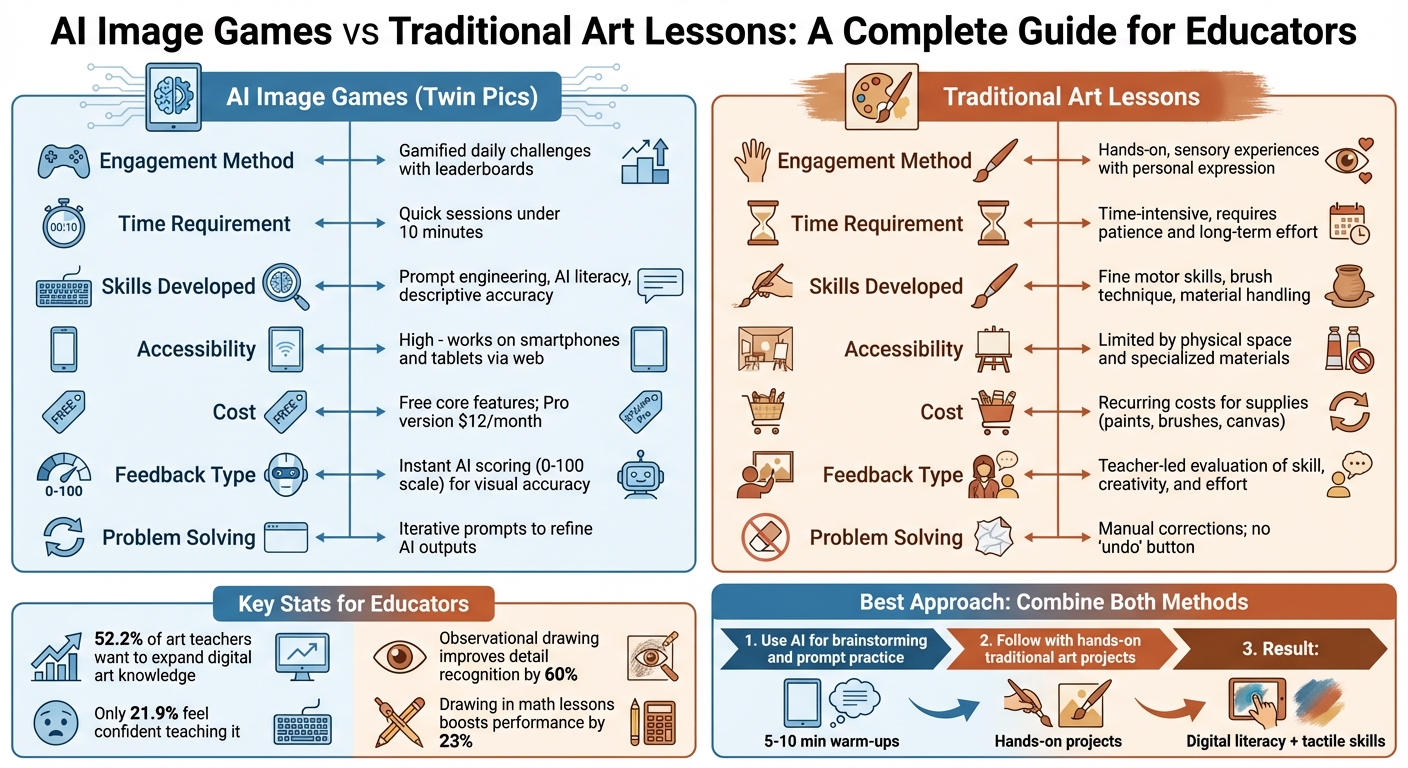
AI Image Games vs Traditional Art Lessons: Complete Comparison Chart
How to use AI Art to Enhance Classroom Teaching and Learning - Teacher PD
sbb-itb-97b6c2e
What Are AI Image Games with Twin Pics?
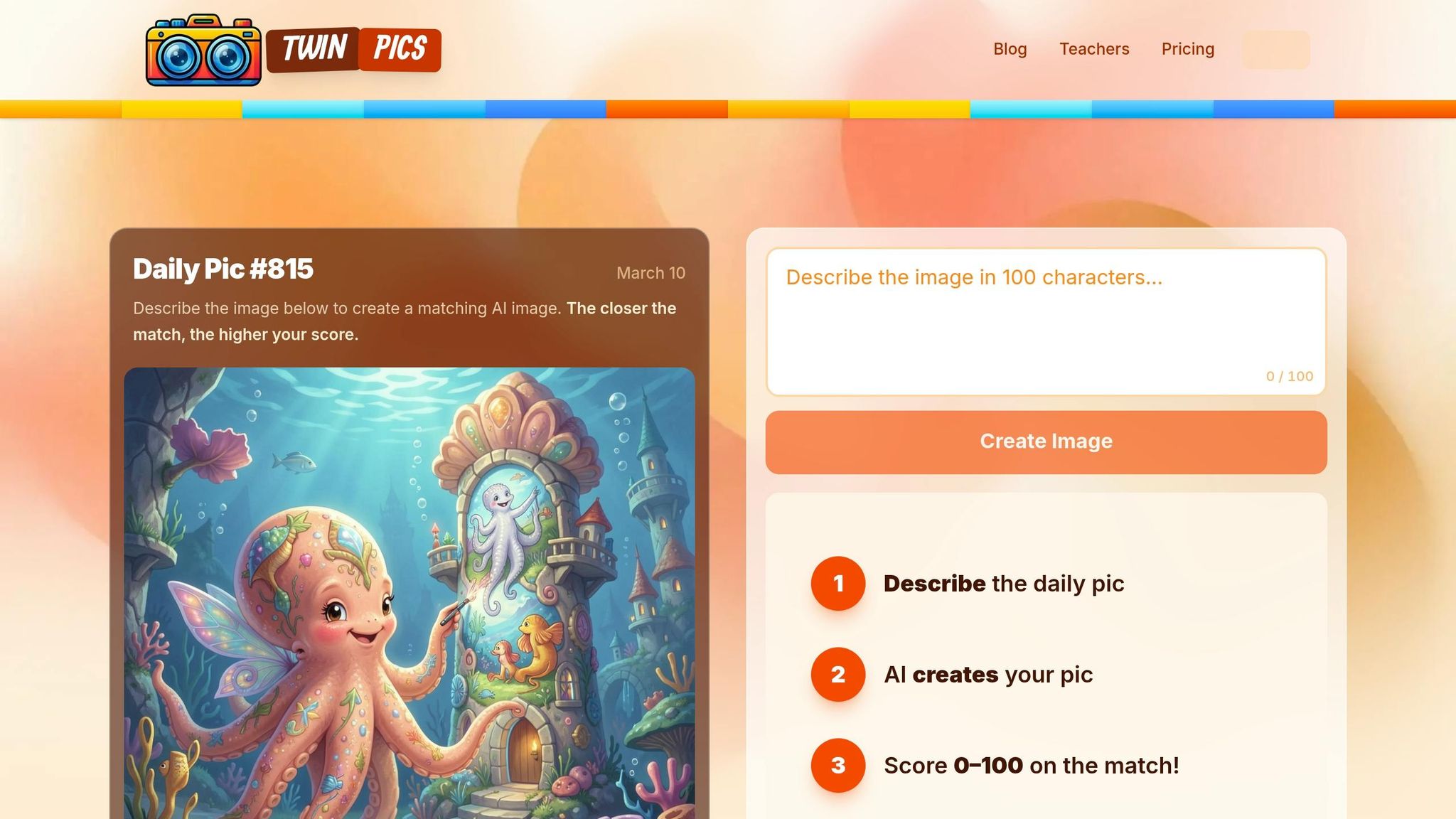
AI image games turn the art of crafting prompts into an engaging, hands-on activity where students actively interact with technology. Instead of passively watching how AI operates, they dive in and learn by doing. Twin Pics, for instance, presents a daily challenge: students get a reference image and must recreate it using a 100-character prompt. The AI then compares their generated image with the original and assigns a similarity score ranging from 0 to 100.
What makes this approach stand out is its focus on learning through constraints. With only 100 characters to work with, students must be selective, prioritizing the most critical visual details. As Sakshi Dhingra from GeniusFirms puts it:
"This isn't about generating pretty pictures. It's about how humans communicate intent to machines."
Created by indie developer Chris Sevillano (known as Chris Sev), Twin Pics is designed for grades 4–12. It’s simple to use - no logins, no complicated setups, and no special software required. Teachers across the U.S. incorporate it into their classrooms, whether as a quick five-minute activity or a longer, structured exercise. It works just as well on individual devices as it does projected for group participation, seamlessly fitting into everyday routines.
How Twin Pics Works in Classrooms
Every day, Twin Pics posts a new reference image. Students analyze the image, craft a descriptive prompt, and submit it. The AI generates an image based on their input and immediately provides a similarity score, creating a real-time feedback loop. This process helps students see how their word choices directly influence the AI’s output.
Teachers can set up classrooms using unique join codes, eliminating the need for student accounts or personal data, ensuring compliance with COPPA regulations. The platform offers a free plan for one classroom with unlimited students, while the Pro plan ($12/month) supports unlimited classrooms - perfect for teachers managing several periods. Both plans include features like classroom leaderboards and access to the daily challenge. As noted by TeachersFirst:
"Understanding how to write effective prompts using generative AI is an important skill, and Twin Pics is an engaging way to learn."
This interactive experience not only enhances classroom engagement but also equips students with essential digital communication skills.
Skills Students Learn with Twin Pics
Twin Pics focuses on teaching prompt engineering - the ability to communicate effectively and clearly with AI systems. Students quickly learn that vague prompts (like "a dog") produce generic images, while detailed prompts (such as "golden retriever puppy, sitting, white background") result in closer matches. Dhingra highlights this benefit:
"Instead of explaining 'prompt engineering' theoretically, Twin Pics lets students feel the difference between vague and precise language in seconds."
Beyond prompt crafting, students develop visual literacy by breaking down images into elements like symmetry, pose, color, and composition. This skill helps them identify which details are essential when working within a tight character limit. They also practice evaluation by analyzing the AI’s output and fine-tuning their instructions.
Twin Pics also introduces students to the variability of AI. Identical prompts can generate different results, encouraging adaptability and problem-solving. Students experiment with AI-specific terms, such as style keywords, lighting effects, and negative prompts (e.g., "--no blurry"), giving them a solid foundation in techniques used by professionals working with AI tools.
What Traditional Art Lessons Include
Traditional art lessons focus on hands-on experiences using materials like clay, charcoal, oil paints, watercolors, and sketchbooks. These classes immerse students in the physicality of art, where they feel the texture of paper, the resistance of brushes, and the weight of different tools. Such tactile engagement builds fine motor skills and sharpens hand-eye coordination in ways that digital screens simply can't replicate. Plus, working directly with these materials teaches students to adapt when mistakes arise.
One of the most striking aspects of traditional art is the absence of an "undo" button. This limitation pushes students to creatively integrate errors into their work, fostering resilience and problem-solving skills. Heidi C. Powell from the University of Florida highlights this by saying:
"We need to restore productive difficulty where we don't mistake polish for growth."
Beyond skill development, traditional art connects creativity to the physical world. Lessons often include art history, an exploration of various styles and mediums, and foundational concepts like shapes, colors, textures, and patterns. For example, students learn color theory by physically mixing paints, discovering how yellow and blue make green - an experience far removed from simply selecting colors on a digital palette. These techniques not only enhance creativity but also improve academic performance. A 2019 State of Art Education Survey revealed that while 52.2% of art teachers wanted to expand their knowledge of digital art, only 21.9% felt confident teaching it, highlighting the ongoing relevance of traditional methods.
Traditional art also emphasizes the creative process itself - repetition, experimentation, and persistence are valued over achieving a flawless final product. Studies show that observational drawing can improve detail recognition by 60%. Additionally, integrating drawing into math lessons can boost student performance by an average of 23% compared to numerical exercises alone.
This deliberate, hands-on approach offers a welcome break from the digital world. The sensory experience - the smell, texture, and weight of materials - engages multiple senses, enriching the learning process. Unlike the virtual interactivity of AI tools, traditional art grounds students in the tangible, providing a balanced perspective on creativity. Middle school art teacher Abby Schukei sums it up well:
"When one learns traditional art techniques, they gain a deeper understanding of the materials and what they can do."
AI Image Games vs Traditional Art Lessons: Comparison Table
When educators weigh the choice between AI image games and traditional art lessons, it's essential to understand how these two approaches work in practice. Both methods encourage creativity, but they do so in very different ways, offering unique benefits depending on the learning goals and classroom environment. Knowing these distinctions can help teachers decide when to use one, the other, or a mix of both.
The differences go beyond just digital vs. physical tools. AI image games, like Twin Pics, operate at lightning speed, allowing students to iterate on ideas quickly. Traditional art, on the other hand, is more of a "slow burn", requiring patience and dedication as projects can stretch over days or even weeks.
Costs also vary. Twin Pics offers its core features - daily challenges, AI scoring, and leaderboards - entirely free ($0). Meanwhile, traditional art involves recurring expenses for materials like paints, brushes, and clay. However, traditional methods bring the added benefit of hands-on experiences, which help students develop fine motor skills and forge a deeper emotional connection with their work. These differences shape not only how lessons are delivered but also how students engage with the creative process. The table below highlights these key contrasts to guide educators in making informed decisions.
Comparison Table
| Attribute | AI Image Games: Twin Pics | Traditional Art Lessons |
|---|---|---|
| Engagement Method | Gamification through daily challenges and leaderboards | Hands-on, sensory experiences with a focus on personal expression |
| Time Requirement | Quick; under 10 minutes per session | Time-intensive; requires patience and long-term effort |
| Skill Development | Focus on prompt engineering, AI literacy, and descriptive accuracy | Development of fine motor skills, brush technique, and material handling |
| Accessibility | High; works on smartphones and tablets via the web | Limited by the need for physical space and specialized materials |
| Cost | Free core features; optional Pro version at $12/month for classrooms | Recurring costs for art supplies like paints, brushes, or canvas |
| Assessment | Instant AI-based scoring (0–100) for visual accuracy | Teacher-led evaluation of skill, creativity, and effort |
| Problem Solving | Iterative prompts to refine AI outputs | Manual corrections; no "undo" button for physical mistakes |
For instance, Twin Pics provides instant feedback with scores from 0 to 100, helping students immediately understand how well their AI images align with a reference. In contrast, traditional art relies on teacher feedback, which, while slower, offers a more detailed and personal critique. These contrasting feedback styles further illustrate how each method can serve different educational purposes.
Benefits of AI Image Games like Twin Pics
AI image games bring a fresh, dynamic energy to classrooms, often surpassing the engagement levels of traditional art lessons. Twin Pics, for instance, transforms creative learning into a fast-paced, interactive experience. Students can see results in seconds, rather than waiting days for a finished piece. Features like daily challenges, leaderboards, and instant scoring create a lively, social environment that keeps students excited and eager to participate. This approach emphasizes how Twin Pics boosts both the speed and engagement of creative learning.
With tools like an undo feature, students can quickly test ideas, get immediate feedback, and refine their work without the fear of making mistakes. A 2025 study revealed that students using AI-generated images showed higher levels of classroom engagement and self-confidence compared to those in traditional lessons. Gains were particularly noticeable in technical skills, creativity, and overall effort.
Increased Engagement Through Gamification
Twin Pics transforms descriptive writing into a competitive activity. Students receive a score from 0 to 100, based on how well their AI-generated image matches a reference, and they can see their rankings on global and classroom leaderboards. This instant feedback keeps students motivated in a way that traditional art critiques - often delivered days later - cannot match.
In March 2025, Samantha, a teacher at the University of Regina, introduced Twin Pics to her Creative Writing 20 class. She challenged her students to beat her high score of 85%. The top student reached 82%, and Samantha observed that "the competitive element added an extra layer of engagement and motivation". The class turned into a lively competition, where students honed their word choice and descriptive precision.
The platform’s 100-character limit encourages students to carefully select impactful adjectives and nouns to describe complex scenes. Susan Sonnemaker, a middle school teacher at San Francisco Day School, shared her perspective:
"The kids I see using iPads are able to engage in creativity in ways they couldn't before, and in an instant, rather than waiting to get their thoughts down on paper".
While the gamification aspect is a major draw, Twin Pics also fosters essential skills in AI literacy.
Building AI Literacy and Critical Thinking Skills
Twin Pics helps students learn how to communicate effectively with AI. They practice prompt engineering - writing precise, detailed instructions for AI systems. For example, they discover how a simple word like "dog" produces vastly different results compared to a more specific phrase like "golden retriever in autumn sunlight".
The game’s "blind theme" challenges push critical thinking even further. Instead of matching a visible image, students must interpret cryptic prompts like "A journey without motion" and create an AI image that reflects that abstract idea. This process strengthens deductive reasoning and metaphorical thinking - skills that traditional art lessons often overlook.
TeachersFirst recommends Twin Pics for students in grades 4 through 12, stating that "understanding how to write effective prompts using generative AI is an important skill, and Twin Pics is an engaging way to learn how to create a short prompt to create images". With strict content filters and COPPA-compliant design, the platform ensures a safe and secure environment for students.
Interestingly, research indicates no significant difference in cognitive load between AI-assisted and traditional methods. This means students aren’t working harder - they’re working smarter. They’re learning to analyze visual composition, recognize AI’s limitations, and refine their communication skills through trial and error, all while enjoying a fun and competitive atmosphere with their peers.
Challenges and Solutions for AI Image Games
When comparing AI image games to traditional art lessons, it's important to tackle the challenges they bring. One major issue is the "shortcut culture" that can emerge when students overly depend on AI-generated content. This reliance can bypass essential foundational skills like shading, anatomy, and perspective, which are critical to artistic development. To counter this, educators should establish clear learning objectives before introducing AI tools. For example, if the focus is on original composition, AI can be limited to brainstorming or generating abstract prompts, while students are required to complete the final artwork by hand. This balance ensures that traditional art techniques are preserved alongside AI experimentation.
Technical limitations also pose a challenge. Twin Pics, for instance, has a strict 100-character limit for descriptions, which might feel restrictive for more intricate ideas. However, this limitation can actually be turned into a teaching tool. It pushes students to refine their vocabulary, moving away from vague terms like "beautiful" and instead using precise phrases such as "Victorian street" or "impressionist style". This practice not only sharpens language skills but also aligns with the principles of effective prompt engineering.
Another significant issue involves accuracy and bias. AI models often struggle with fine details like text, numbers, or scientific precision, and they can unintentionally reflect societal biases embedded in their training data. Michelle Connolly, Founder of LearningMole, emphasizes the importance of ethical practices in the classroom:
"Teachers need to model ethical technology use, and that includes being transparent about AI-generated content with both colleagues and students".
To address this, educators can pre-screen AI-generated images before showing them to students and incorporate activities like "Real vs. AI" quizzes. These exercises help students spot common AI flaws, such as extra limbs, misspelled text, or unrealistic architectural designs.
Finally, managing screen time is a concern for many teachers. A practical solution is adopting a "hands-on first, digital second" strategy. For instance, students can start with a physical art project - like a watercolor or pencil sketch - before using AI to remix or analyze their work. This approach keeps traditional skills intact while offering a chance to explore AI's potential. Twin Pics, with its 24-hour daily challenge cycle, works best as a brief warm-up activity rather than a prolonged exercise, making it easy to integrate without overloading screen time.
Benefits and Limitations of Traditional Art Lessons
Traditional art lessons offer an irreplaceable tactile experience that digital tools simply can't match. Activities like pressing a pencil to paper or shaping clay go beyond creativity - they develop fine motor skills and hand-eye coordination in ways that swiping on a screen just can't replicate. Even the act of mixing paints to create new colors fosters a deeper understanding of color theory compared to selecting a hex code on a digital palette. These hands-on interactions not only build physical skills but also promote creative problem-solving that sticks with students over time.
Another key advantage is the resilience traditional art fosters. With no "undo" button, students learn to adapt when mistakes happen - whether by reworking their piece, incorporating the error into their design, or starting over entirely. This process, often referred to as "productive difficulty", teaches patience and persistence, shifting the focus from instant gratification to meaningful skill development. Sue Loesl, an Adapted Art Specialist, sums it up well:
"Accessible art is the practice of adapting the media, techniques or tools of an art project so that any student can be as independently creative as possible".
This resilience complements the dynamic, immediate feedback that AI tools can offer, creating a well-rounded approach to creative learning.
But traditional art isn’t without its challenges. Supplies like paints, brushes, and canvases can become costly over time. While a pencil and sketchbook are affordable, high-quality materials quickly add up. Physical classroom environments can also pose barriers. High tables, narrow pathways, and inaccessible sinks can make it difficult for students in wheelchairs to fully participate. For neurodiverse students, sensory issues - such as loud noises, sticky textures, or working with messy materials like clay - can create additional hurdles.
The rise of virtual and hybrid learning has exposed another limitation: the difficulty of replicating hands-on studio experiences online. As RMCAD points out:
"Online art classes lack access to physical materials and dedicated art studios... students may be tasked with providing their own materials, which could lead to discrepancies or inconsistencies".
Virtual platforms also struggle to deliver the real-time feedback and live demonstrations that are hallmarks of in-person instruction.
Despite these obstacles, traditional art remains essential for its sensory richness. The smell of paint, the texture of a canvas, and the physical resistance of materials offer a "digital detox" from screen-heavy environments. These experiences lay the groundwork for foundational skills that students can later apply to digital media. The challenges of traditional art underscore the value of combining it with digital methods for a more balanced, comprehensive approach.
Combining AI Image Games with Traditional Art Lessons
Merging AI image games with traditional art lessons creates a well-rounded approach to fostering creativity and learning.
Blending Digital and Physical Creativity
Twin Pics acts as a bridge between digital prompts and hands-on art, helping students build a precise art vocabulary that enhances both analysis and creation. For instance, when students describe terms like "Impressionist brushstrokes" or "Steampunk textures" in a concise, 100-character prompt, they develop art history knowledge that can be applied to studying paintings or crafting mixed-media projects.
Picture this: Twin Pics as a quick five-minute warm-up before diving into traditional art projects. Students might start the class by matching an AI-generated image and then transition to sketching that same concept using pencils and paper. This process reinforces the "language of art", serving as the critical link between digital and physical creativity. As Lidia from The Art of Inquiry puts it:
"It's descriptive writing disguised as a digital art class, and honestly, the engagement level is unmatched".
Think of AI tools as digital playgrounds that ignite curiosity and foster critical thinking. For example, students could generate an image in Twin Pics and then recreate the scene with watercolors or colored pencils. This not only encourages reflection on how humans and machines interpret symbols differently but also highlights the unique clarity, complexity, and intentionality of human-made art compared to AI creations.
These combined strategies naturally pave the way for lesson plans that integrate both digital and traditional art techniques.
Sample Lesson Plan Ideas
Here are some practical ways educators can bring this integrated approach into their classrooms:
-
Story Setting Comparison
Students craft a descriptive prompt and use Twin Pics to generate an image. They then paint the same scene by hand, comparing the AI's interpretation with their own. This activity emphasizes the contrast between algorithmic randomness and human intentionality while building descriptive writing skills. -
History in Plastic
Students research a historical figure and use Twin Pics to design a digital "action figure" inspired by their findings. They follow up by sketching their own version by hand, comparing the AI's design choices with their artistic interpretations. This lesson blends digital literacy with social studies. -
Digital Surreal Collage
Students start by creating a physical collage using magazine cutouts, focusing on themes like "dislocation" or "change of scale." Then, they replicate the collage using AI prompts in Twin Pics. The 100-character limit forces them to prioritize specificity, a skill that directly benefits art critiques and descriptive writing.
These lesson ideas demonstrate how AI tools and traditional art methods can complement each other, offering students the best of both worlds.
Conclusion: Finding the Right Balance
Blending AI tools like Twin Pics with traditional art methods can create a well-rounded art education experience. Each approach brings its own strengths, and when used together, they help students develop both digital and tactile creative skills.
Think of AI tools as partners in the creative process rather than substitutes for hands-on methods. For example, using Twin Pics to practice prompt engineering, followed by physical art projects, builds both digital fluency and the hands-on skills that are vital for artistic growth. As Patti Pente, Professor at the University of Alberta's Faculty of Education, puts it:
"I would love to see students use generative AI - with prompts around particular topics - but also work with hands-on materials. We don't want to lose that because there's lots of wonderful learning that happens when kids are immersed in making art with their hands".
This balanced strategy is supported by research. Studies suggest that integrating AI-assisted methods can boost student engagement and confidence compared to traditional instruction alone. However, experts caution against relying too heavily on AI, as it may lead to uniformity in creative outputs when standardized tools dominate.
To strike the right balance, set clear boundaries in the classroom to preserve the tactile and emotional benefits of traditional art. For instance, Twin Pics can serve as a warm-up activity to build descriptive vocabulary, which students can then apply in hands-on projects. This approach ensures that digital tools enhance, rather than replace, the patience, perseverance, and emotional expression that come from working with physical materials. By offering multiple ways to create and experiment, students can develop the critical thinking skills they need in an increasingly digital world.
FAQs
How do I grade Twin Pics without rewarding 'guess-and-check'?
Grading students' work based on their prompts and descriptions can shift the focus from mere trial-and-error to intentional communication. Assess elements like clarity, originality, and accuracy in how they articulate their goals to the AI. Encourage students to detail the reasoning behind their prompts or explain the choices they made. This method prioritizes thoughtful expression, fostering skills in descriptive writing, prompt design, and digital literacy. It also moves attention away from traditional similarity scores, promoting a more skill-focused learning process.
What’s a good AI-to-hands-on ratio for an art class?
A well-thought-out balance between AI-driven tasks and hands-on activities depends on your teaching goals and how engaged your students are. Typically, dedicating 30-50% of class time to AI-focused tasks - like generating images or crafting prompts - and 50-70% to traditional hands-on art activities, such as drawing or painting, works well. This approach allows students to develop both their digital skills and their tactile artistic abilities. However, the ideal ratio will ultimately depend on your specific curriculum and the resources you have available.
How can I address AI bias and accuracy issues with students?
Helping students critically assess AI-generated content is key to developing their analytical skills. Start by teaching them to spot common mistakes in AI outputs, such as deformed hands, inconsistent shadows, or other visual anomalies in AI-generated images. These errors often reveal the underlying limitations of AI models.
Explain how AI models work, breaking down their process in a way that’s easy to grasp. Highlight their strengths, but also emphasize their limitations, such as struggles with context or accuracy. Discuss how prompts - the instructions given to the AI - play a crucial role in shaping the final output. For instance, a vague or overly broad prompt can lead to less reliable or coherent results.
Encourage critical thinking with hands-on activities. Have students analyze AI-generated images or text, asking questions like: Does this seem accurate? Are there any signs of bias? Foster open discussions about verifying content, recognizing potential biases, and questioning the reliability of AI-generated information.
By developing these skills, students will be better equipped to responsibly interpret and challenge AI outputs, ensuring they approach such content with a healthy dose of skepticism and curiosity.