
What Is Prompt Engineering? A Teacher's Guide
What Is Prompt Engineering? A Teacher's Guide
Prompt engineering is the process of crafting clear and specific instructions to guide AI tools for better results. Unlike typing keywords into a search engine, this involves providing detailed context, requirements, and desired outcomes. For example, instead of saying, "Explain photosynthesis", you might ask, "Describe the steps of photosynthesis in simple terms for an 8th-grade science class." This approach improves AI responses by being more precise.
Why does it matter for teachers?
- Saves time: Teachers using AI for lesson planning can cut prep time by up to 30%.
- Enhances learning: Teaching students how to create effective prompts develops critical thinking and AI literacy.
- Practical in classrooms: Aligns with problem-solving processes like the Engineering Design Process in science standards.
How to teach it:
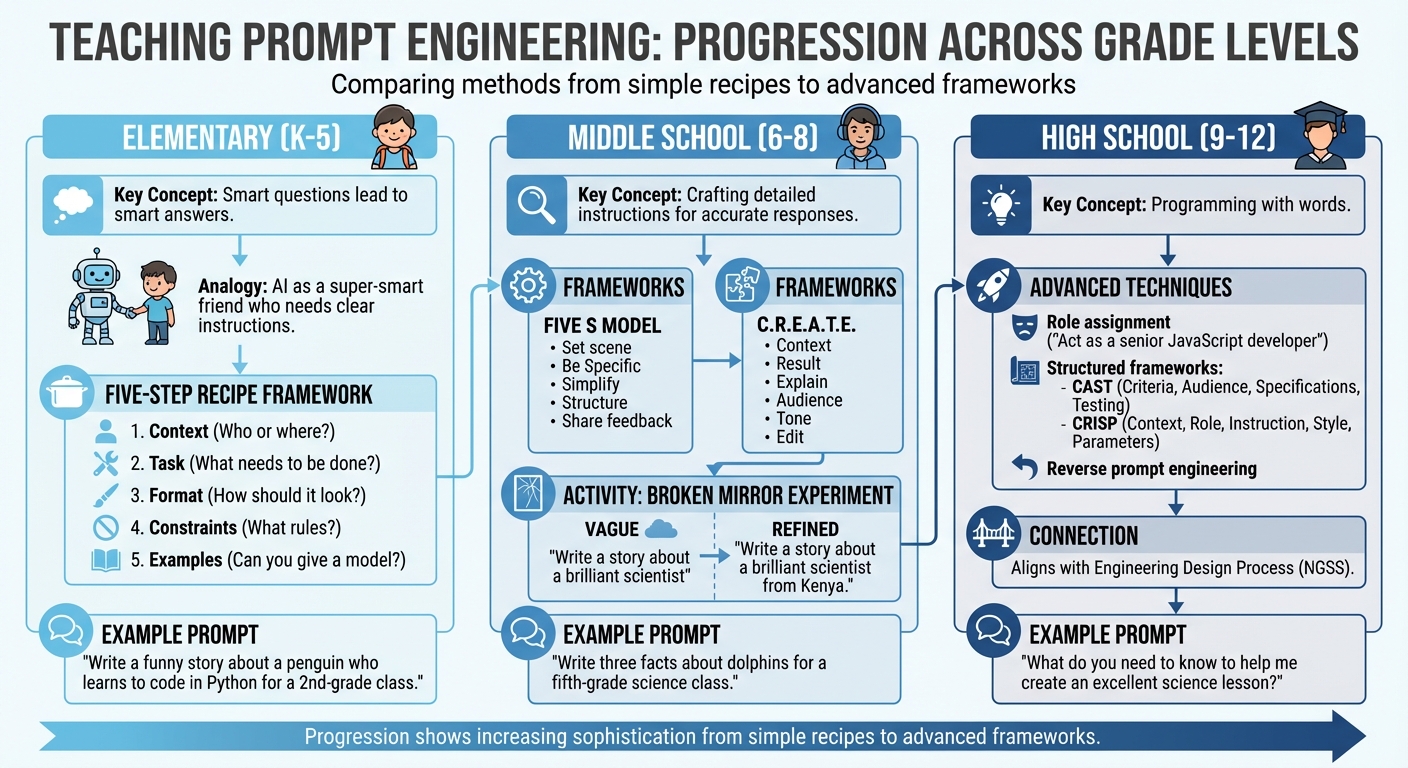
- Elementary students: Use simple steps like "Context, Task, Format, Constraints, Examples" to show how clear instructions lead to better answers.
- Middle schoolers: Introduce frameworks like Five S Model or C.R.E.A.T.E. and activities like refining vague prompts into detailed ones.
- High schoolers: Treat it as "programming with words" and use structured methods like CAST or CRISP for advanced tasks.
Practical techniques include instruction-based prompts with strong action verbs, example-based prompts to guide AI responses, and iterative testing to refine outputs. Tools like Twin Pics make learning interactive by letting students generate AI images based on precise prompts, helping them understand how word choices shape AI results.
Takeaway: Prompt engineering equips teachers and students with essential skills to effectively use AI tools, fostering better communication with technology while encouraging responsible and critical use.
Ep 02: Prompt Engineering for Teachers
sbb-itb-97b6c2e
How to Explain Prompt Engineering to Different Grade Levels
Teaching Prompt Engineering by Grade Level: K-12 Framework Guide
Breaking down the concept of prompt engineering can be tailored to fit the understanding of different age groups. Here's how to make it relatable and engaging for each level.
Elementary Students (K-5)
For younger kids, think of AI as a super-smart friend who needs very clear instructions because it doesn’t guess like people do. Explain it using a simple idea: "Smart questions lead to smart answers." If the instructions are unclear, the results won’t be helpful - this is called the GIGO (Garbage In, Garbage Out) Principle.
To make it hands-on, teach them a simple recipe for creating prompts with five steps:
- Context (Who or where?)
- Task (What needs to be done?)
- Format (How should it look?)
- Constraints (What rules should it follow?)
- Examples (Can you give a model?)
For instance, instead of saying, "Write a story", show them how to be specific: "Write a funny story about a penguin who learns to code in Python for a 2nd-grade class."
"Prompt engineering for kids is like being a translator between human thoughts and AI understanding." - Preetha Prabhakaran
Middle School Students (6-8)
For middle schoolers, introduce prompt engineering as a way of crafting detailed instructions to get accurate responses from AI. Explain that the more specific and organized their prompts are, the better the AI will perform. Frameworks like the Five S Model (Set the scene, be Specific, Simplify language, Structure the output, and Share feedback) or C.R.E.A.T.E. (Context, Result, Explain, Audience, Tone, and Edit) can help them organize their thoughts.
"It's how you ask an AI tool for help. If you just say 'Tell me about animals,' you'll get a random answer. But if you say 'Write three facts about dolphins for a fifth-grade science class,' the answer will be much better." - Flint K-12
A fun classroom activity is the Broken Mirror Experiment. Start with a vague prompt like, "Write a story about a brilliant scientist." Then, ask them to refine it: "Write a story about a brilliant scientist from Kenya." This exercise shows how adding details reduces assumptions and bias. It also shifts the focus from just checking if the AI’s answer is correct to understanding why it generated that response.
High School Students (9-12)
For high schoolers, present prompt engineering as a way to "program with words" to guide AI outputs. Encourage them to see AI as a partner for solving complex challenges, not just a tool for quick answers. One way to do this is by assigning roles to the AI, like saying, "Act as a senior JavaScript developer" to debug code or "Act as a senior SEO strategist" to handle technical workflows. This approach reinforces the idea that precise prompts lead to better results.
"Learning how to write effective prompts will empower learners to be the drivers of AI rather than being driven by it." - Heidi Hayes Jacobs and Michael Fisher
Introduce structured frameworks like CAST (Criteria, Audience, Specifications, Testing) or CRISP (Context, Role, Instruction, Style, Parameters) to help them craft detailed prompts. You can also teach reverse prompt engineering by asking the AI, "What do you need to know to help me create an excellent science lesson?" This mirrors the Engineering Design Process from the Next Generation Science Standards, where students define problems, test ideas, and refine their solutions through iteration.
Basic Techniques for Writing Effective Prompts
Building on earlier insights into prompt engineering, these techniques provide practical ways to craft prompts that get the best responses from AI. Effective prompts generally have three main parts: context (the "who" and "why"), a clear task or instruction (the "what"), and an output format or indicator (the "how").
Instruction-Based Prompts
Instruction-based prompts work by clearly defining the task for the AI. Using strong action verbs like "summarize", "draft", "explain", or "brainstorm" is key. Adding details about your target audience can also shape the response. For example, asking "Explain photosynthesis for 5th-grade students with ADHD" leads to a more tailored answer than simply saying "Explain photosynthesis."
A helpful framework for these prompts is PREP, which stands for Prompt (the request), Role (assigning a persona like "expert historian"), Explicit instructions (specific details or data), and Parameters (boundaries like tone or length). Instead of saying "Write a lesson plan", you could try: "You are a 7th-grade science teacher. Create a 45-minute lesson plan on the water cycle that includes a hands-on experiment and stays under 500 words."
"Think of AI like a super smart but very literal student teacher on their first day. You need to be specific and provide lots of background information." - iLearnNH
Avoid negative phrasing, like "Don't make it too long." Instead, use positive constraints such as "Keep the response under 200 words". If the AI's response isn't quite right, ask for feedback: "What information do you need from me to write a better lesson plan on this topic?".
Example-Based Prompts
Example-based prompts - also called few-shot prompting - rely on providing examples to guide the AI's response. As Dr. Cynthia Sosa from TAMIU explains, "A 'shot' is another name for an example. So, when you are providing your prompt, you may or may not provide examples to steer AI toward a better response". This approach is especially useful for complex tasks like grading or categorizing information.
For instance, if you want AI to create discussion questions in a specific style, you might say: "Create three discussion questions about To Kill a Mockingbird for high school students. Example 1: How does Scout's perspective change throughout the novel? Example 2: What role does Boo Radley play in the story's theme of empathy?" The AI will then generate questions that match the tone and depth of your examples.
This technique is great for ensuring consistency across multiple tasks, such as creating a series of warm-up activities or exit tickets that follow the same structure.
Testing and Improving Prompts
Creating effective prompts is an iterative process - it often takes several tries to get the desired results. Think of it as a dialogue where you refine the AI's output by adding constraints like word limits, formatting, or context.
One strategy is comparative testing: use the same prompt across different AI tools to see which one gives the best results for your needs. You can also ask the AI to critique its own response or suggest ways to improve your prompt. For example, after an initial response, follow up with: "How could I improve this prompt to get a more detailed answer?"
Involving students in this process can make it an engaging learning activity. For example, in September 2024, Joseph Polito, a teacher at Joseph F. Lamb Middle School in Brooklyn, NY, had his 7th-grade students explore how prompts shape AI responses. Students were divided into groups with roles like "scientists" or "pet shop owners" and asked to complete the sentence "A dog is...". Scientists gave factual answers (mammal, canine), while pet shop owners offered emotional descriptions (loyal, best friend). They then compared their answers to AI-generated ones, learning how parameters influence results.
"When you learn to create precise prompts, AI rewards you with differentiated lesson plans, activities, and assessments tailored to your students' needs and interests." - Sharon Hall, Education Consultant
While a growing number of teachers (33%) use AI for tasks like lesson planning and rubric creation, 70% report they haven't received professional training on effective AI use. Practicing these techniques helps build the confidence and skills needed to work effectively with AI tools.
Teaching Prompt Engineering with Twin Pics
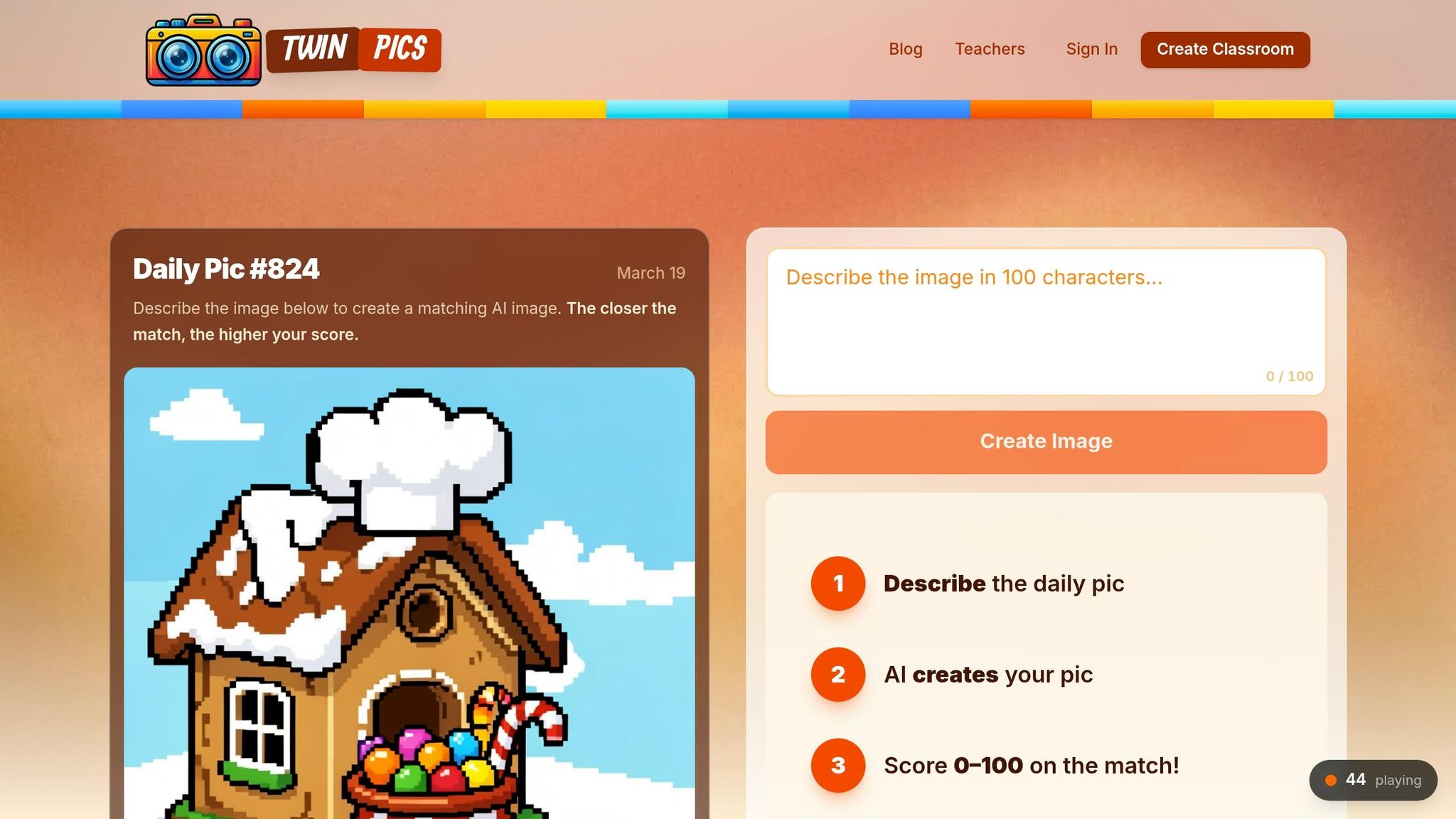
Twin Pics turns the concept of prompt engineering into a hands-on, interactive experience where students immediately see how their word choices influence AI-generated images. Students are given a reference image and tasked with crafting a 100-character text prompt to generate an AI image that matches the original as closely as possible [18,20]. The platform then scores the similarity between the two images on a scale from 0 to 100%, giving students immediate feedback on how effectively their descriptive language translated into visuals [18,19]. Let’s dive into how features like daily challenges, leaderboards, and ready-to-use activities bring prompt engineering to life in the classroom.
Daily AI Image Challenges
The core of Twin Pics lies in teaching students how to use precise language. With only 100 characters to work with, they must carefully choose adjectives and style modifiers like "hyper-realistic" or "cinematic" to guide the AI’s output [5,18]. New challenge images appear frequently - some as often as every 30 minutes - with a daily reset. This setup encourages iterative learning as students tweak their prompts to improve their similarity scores [20,21].
"Understanding how to write effective prompts using generative AI is an important skill, and Twin Pics is an engaging way to learn how to create a short prompt to create images." – TeachersFirst
In March 2025, Samantha Gold incorporated Twin Pics into her Creative Writing 20 class during a lesson on descriptive writing. She introduced a "Beat the Teacher" challenge, where students tried to top her high score of 85%; the closest attempt reached 82%. Gold used a $20.00 annual group subscription to offer her students unlimited attempts and to bypass the platform’s wait queue during the activity.
Using Classroom Leaderboards
Twin Pics includes both classroom and global leaderboards, adding a layer of friendly competition. These leaderboards encourage students to analyze high-scoring prompts and understand why certain word combinations were more effective [18,20]. Teachers can use these examples to spark discussions and help students learn from one another’s strategies. Designed for grades 4 through 12, the platform is also COPPA-compliant, requiring no student accounts or personal information [18,19]. This makes it a safe and accessible tool for fostering collaborative learning.
Ready-to-Use Classroom Activities
Twin Pics is perfect for quick, engaging classroom activities. It works well as a "five-minute time filler" with zero prep required. If individual devices aren’t available, teachers can turn it into a group exercise by asking students to write prompts on paper, selecting one at random, and entering it together to see the results [18,19]. While the daily challenge, global leaderboard, and one classroom are free, teachers managing multiple classes can opt for a Pro plan at $12.00 per month. This plan unlocks unlimited classrooms and provides priority support.
"Instead of explaining 'prompt engineering' theoretically, Twin Pics lets students feel the difference between vague and precise language in seconds." – Sakshi Dhingra, Reviewer, GeniusFirms
Using Prompt Engineering Across Your Curriculum
Prompt engineering isn’t just a tech trick; it’s a versatile tool that can enhance learning in every subject. By focusing on clarity, context, and constraints, educators can bring out the best in AI tools across a wide range of disciplines.
Prompt Engineering in Different Subjects
The beauty of prompt engineering lies in its adaptability to various subjects, making it a powerful addition to any classroom.
In math, teachers can use Chain-of-Thought (CoT) prompting to guide students through complex problems step by step. For instance, instead of asking an AI to simply solve "3x - 5 = 10", students could prompt it with, "Explain how to isolate the variable and solve step-by-step." This mirrors the logical reasoning students need to master.
In science, prompts aligned with NGSS standards can elevate lesson planning. A specific request like, "Design a 60-minute lesson on photosynthesis aligned to NGSS 2-LS2-1 with hands-on activities", demonstrates how detailed prompts can lead to more useful AI-generated content.
For English Language Arts, persona-based prompts can be a game changer. Students might set the stage with something like, "I am a 10th-grade English teacher starting a unit on Macbeth", before asking for essay prompts or discussion questions. Over in art, style modifiers such as "photo-realistic", "cartoon", or "watercolor" can help students visualize historical events or literary scenes, showing how descriptive language directly influences AI-generated imagery.
These examples highlight how precise prompts can support learning across disciplines, encouraging students to think critically and communicate effectively.
Quick Activities for Class Openers and Closers
Prompt engineering can also be woven into classroom routines to energize students at the start or end of lessons.
- Bell Ringers: Kick off class with a quick challenge like reworking a simple sentence. For example, take "The fox was quick" and ask the AI to generate five sensory-rich alternatives. Another option is reverse outlining - students can paste a paragraph into an AI tool to get a bulleted outline, helping them refine their writing.
- Closers: Wrap up with activities that encourage critical thinking. For instance, students can analyze AI outputs for implicit biases in gender or ethnicity and refine prompts to make them more inclusive. These exercises not only sharpen communication skills but also teach students the importance of precision in both writing and AI interactions.
Teaching Responsible AI Use
Beyond practical applications, learning prompt engineering opens the door to conversations about ethical AI use, helping students navigate the digital world responsibly.
When students evaluate AI outputs for accuracy, they strengthen their critical thinking skills. This is especially important given that 98% of survey respondents identified a need for ethical AI education, yet 70% of educators haven’t received professional development on the topic.
"Teaching prompt engineering isn't about adding another tech skill to your curriculum. It's about giving students the literacy they need to communicate effectively with the tools that will define their careers." – EducationDaily
Teachers can emphasize transparency by requiring students to cite AI assistance just as they would human sources. Assignments could include bias audits, where students evaluate AI-generated content for stereotypes or missing perspectives, and fact-checking exercises to ensure accuracy using reliable sources. These habits encourage students to approach AI critically and responsibly.
The stakes are high: 66% of leaders say they won’t hire someone without AI skills, and workers with advanced AI knowledge earn 56% more than their peers in similar roles. With 42% of employees expecting significant changes in their jobs due to AI within the next year, teaching responsible prompt engineering now equips students with skills they’ll need in an AI-driven future. By embedding these lessons into daily learning, educators prepare students to face real-world challenges with confidence.
Getting Started with Prompt Engineering in Your Classroom
You don’t need to overhaul your entire curriculum to introduce prompt engineering. A great first step is simply experimenting with a leading chatbot like ChatGPT, Copilot, Gemini, or Claude. This hands-on exploration not only builds your confidence but also equips you to guide students through their own prompt experiments. It also sets the stage for integrating tools like Twin Pics into your lessons.
Twin Pics makes teaching prompt engineering approachable by turning abstract AI concepts into interactive challenges. It’s free, works on any device, and doesn’t require student accounts. You can set up your classroom with a unique join code and dive straight into the daily challenge. The platform’s strict 100-character limit pushes students to focus on "prompt density" and precise descriptions instead of relying on overly long instructions.
"Teachers often describe it as a way to make abstract AI concepts tangible. Instead of explaining 'prompt engineering' theoretically, Twin Pics lets students feel the difference between vague and precise language in seconds." – Sakshi Dhingra, Reviewer
Once your classroom is ready, incorporate the Daily Pic challenge into your routine. This quick, five-minute opener builds a habit of experimentation. The public leaderboard adds a competitive edge, showcasing high-scoring prompts as real-time examples of effective communication. Encourage students to use their first attempt as a starting point and improve their score by refining their language. This simple activity reinforces earlier lessons on crafting better prompts through practice.
With about 33% of teachers already using AI tools but 70% lacking professional development in this area, starting with a gamified platform like Twin Pics lowers the entry barrier. It helps students see how thoughtful language choices directly shape AI responses.
FAQs
What’s the easiest prompt framework to start with?
Getting started with AI prompts can feel overwhelming, but a straightforward three-step framework can make it easier. Here's how it works:
- Provide Clear Context: Set the stage by giving the AI enough background information. This helps it understand the scenario or subject you're working with.
- Define a Specific Task: Clearly outline what you want the AI to do. The more precise you are, the better the results will align with your expectations.
- Clarify the Desired Output: Specify what kind of result you're looking for - whether it's a list, a paragraph, a summary, or something else entirely.
By following these steps, you'll guide the AI effectively and get results that are more accurate and aligned with your needs. It's a great way to build confidence in creating prompts, especially for educational purposes.
How do I prevent students from copying AI answers?
To help students avoid simply copying AI-generated answers, it's important to design prompts that push them to think critically and provide personalized responses. For example, you could ask questions that require them to draw on their own experiences, analyze specific scenarios, or offer unique perspectives.
Another approach is teaching students how to create their own prompts for AI tools. This not only helps them engage actively with the technology but also gives them a sense of ownership over the learning process.
You can also incorporate activities where students explain their reasoning behind an answer or refine AI-generated responses. These tasks encourage deeper understanding and discourage reliance on copying, as they require thoughtful interaction with the material.
How can Twin Pics fit into a 5-minute warm-up?
Twin Pics is perfect for kickstarting a lesson with a creative twist. In just five minutes, students can dive into an engaging activity that ties directly into the day’s topic. For instance, you could challenge them to craft a prompt like “Imagine a futuristic classroom” and use AI to generate images on the spot.
This quick exercise not only gets their creative juices flowing but also serves as an introduction to AI concepts. Plus, it seamlessly connects to your lesson content without requiring a lot of prep time. It’s a simple, effective way to warm up their minds and set the tone for the rest of the lesson.