
How to Set Up a Daily AI Challenge for Students
How to Set Up a Daily AI Challenge for Students
Want to teach students how to work with AI in just 5 minutes a day? Daily AI challenges using tools like Twin Pics can help students practice concise writing, critical thinking, and technology interaction - all while having fun. Here's how you can integrate these activities into your classroom:
- Why it matters: AI isn't replacing teachers, but teachers leveraging AI will lead the way. These challenges prepare students for a tech-driven future.
- How it works: Students create 100-character prompts to replicate daily reference images. They receive instant feedback with similarity scores (0-100) and rankings on live leaderboards.
- Setup: Twin Pics is free, COPPA-compliant, and works on any browser. Teachers can create classrooms, share join codes, and start challenges without hassle.
- Benefits: Quick activities (under 10 minutes) fit any schedule, improve writing precision, and spark engagement through friendly competition.
- Subjects: Use these challenges to teach descriptive writing, explore science topics, analyze historical figures, or discuss AI's role in art.
With over 800 educators already using Twin Pics, it's easy to start. The free plan offers unlimited classrooms and students, while the $12/month Pro plan adds features like priority support. Whether as a morning activity, transition tool, or group exercise, these challenges make AI literacy accessible and engaging for K-12 students.
Step 1: Setting Up Twin Pics for Your Classroom
Creating Your Free Account
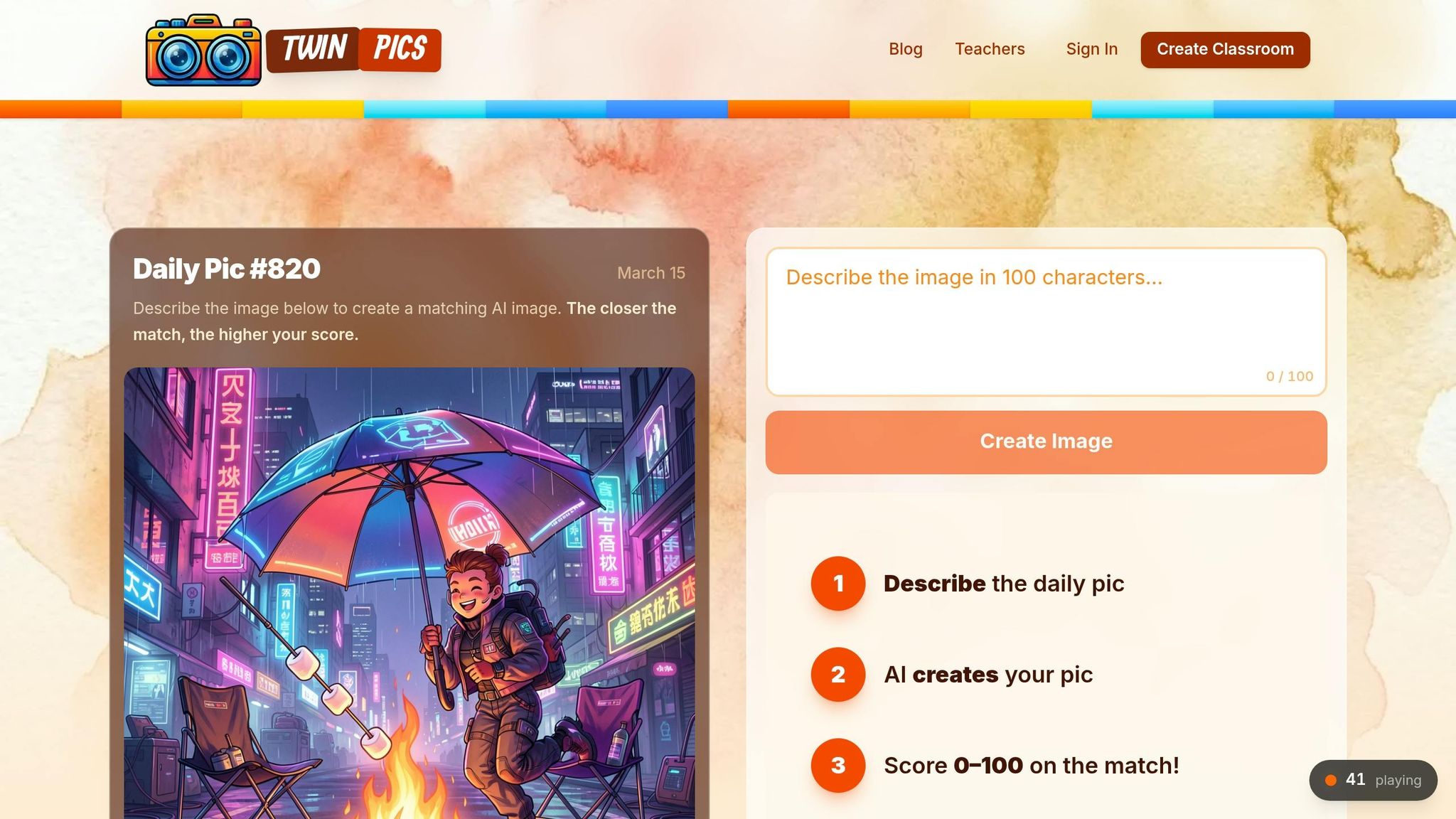
Getting started with Twin Pics is quick and simple. Head over to the platform, create your classroom, and you're ready to go - no credit card or lengthy forms needed. Once your classroom is set up, you'll get a unique join code. Students can use this code to join the session by entering it and picking a nickname. A built-in profanity filter ensures everything stays appropriate. Plus, Twin Pics is COPPA-compliant, meaning no personal data is collected. Since it works on any device with a web browser, you can dive into daily challenges right away. From there, you can explore the features that make Twin Pics an engaging tool for your classroom.
Understanding Twin Pics Features
Once your classroom is live, a new reference image shows up every 24 hours. Students then create a prompt (up to 100 characters) to replicate the reference image. The AI engine analyzes their work and assigns a similarity score ranging from 0 to 100. The classroom leaderboard updates every 30 minutes, showcasing the top scores and encouraging students to reflect on what makes prompts effective. These features not only simplify daily challenges but also encourage students to think critically and creatively.
Twin Pics is already being used by over 800 educators across 340 schools in 7 countries. Students have created more than 2.7 million AI images while keeping content appropriate. The platform currently boasts over 122,000 daily players. The best part? The free plan offers unlimited classrooms and students with full access to core features. For teachers managing multiple classes, the Pro plan is available at $12/month and includes priority support.
sbb-itb-97b6c2e
Step 2: Adding Daily AI Challenges to Classroom Routines
Scheduling AI Challenges
Twin Pics challenges take less than 10 minutes to complete, making them a quick and effective way to sharpen student writing with the 100-character limit. These challenges can fit easily into your daily schedule without disrupting lessons.
Morning activities are an ideal time to introduce them. As students settle in, they can dive into Twin Pics and start crafting their prompts right away. Alternatively, use these challenges as quick transitions when a lesson wraps up early or as exit tickets to assess how well students communicate their ideas.
If your classroom doesn’t have individual devices, you can still make it work as a group activity. Students can write their 100-character prompts on paper, and you can randomly select one to generate an image for the class to discuss together. This approach not only fosters collaboration but also keeps the activity brief and engaging.
Now, let’s look at how these challenges can connect to various subjects in your curriculum.
Connecting Challenges with Subjects
The daily image refresh in Twin Pics makes it easy to incorporate challenges into any subject. Here are some examples of how different subjects can benefit:
| Subject Area | How to Use Twin Pics |
|---|---|
| English Language Arts | Encourage descriptive writing by having students create prompts using precise and vivid adjectives. |
| Science | Investigate how AI interprets prompts related to topics like sustainable architecture or disease patterns. |
| History | Research historical figures and craft prompts to generate AI-created portraits that represent them. |
| Art & Design | Explore visual literacy by analyzing AI-generated images for elements like symmetry, color tone, and composition. |
"Use this site as a five-minute time filler to engage students in descriptive writing activities." – TeachersFirst
Begin by modeling the process as a class. Show students how using specific and detailed language leads to better results, then let them try it themselves. The instant feedback - where students see their similarity score within seconds - helps them understand the link between precise language and successful outcomes.
Step 3: Running and Managing Daily AI Challenges with Twin Pics
Launching the First Challenge
Start by creating a Free Classroom to get a unique join code. Students can join using just a nickname, and the built-in profanity filter ensures everything stays appropriate. Display the daily reference image on your classroom screen and guide students through the process step by step. Show them how to craft a concise 100-character prompt and how the AI transforms it into an image.
The platform provides instant feedback with a similarity score from 0 to 100, helping students immediately see how their word choices influence the AI's output. For the first challenge, try a collaborative approach: have the class brainstorm descriptive words together, then pick one student’s prompt to generate an image and review it as a group. This method works well for fostering teamwork and discussion.
"Can you describe an image well enough that an AI can recreate it? ... This isn't about generating pretty pictures. It's about how humans communicate intent to machines." – Sakshi Dhingra, Reviewer
Once students are familiar with the basics, dive into the leaderboard and iterative prompting features to make the activity even more engaging.
Increasing Student Participation
The leaderboard is a powerful tool for boosting engagement. It highlights top-scoring images and the prompts behind them, encouraging friendly competition. Prompt iteration, on the other hand, allows students to refine their language and see how even small changes can impact their scores. Watching how different descriptive words lead to higher similarity scores fosters peer learning and inspires students to improve their own prompts.
Encourage students to experiment with their prompts. Since AI operates stochastically - producing varied results from the same input - they can tweak their wording and observe how their score shifts. This hands-on practice deepens their understanding of AI.
The platform has already been adopted by over 800 educators across 340+ schools in 7 countries. Teachers consistently note that the 100-character limit, combined with the leaderboard, keeps students engaged and focused. Plus, the daily refresh makes it easy to integrate into your routine, whether as a bell ringer, brain break, or a quick activity for early finishers.
Step 4: Teaching AI Literacy Through Classroom Discussions
Analyzing AI-Generated Images
Twin Pics transforms everyday challenges into opportunities for learning. After students submit their prompts, you can use the leaderboard as a springboard for discussions. For example, ask why one prompt earned a score of 85 while another got 42. This activity highlights how AI processes language differently depending on word choice and specificity.
This exercise emphasizes the importance of precise language. For instance, vague prompts like "a smart scientist" or "a successful leader" often result in stereotypical images. This outcome demonstrates how biases in training data influence AI outputs. As the GIANT AI Guide for Educators explains:
"If the datasets being used to train AI models are biased, then the AI generated outputs will also be biased".
Encourage students to predict which prompts might score higher, focusing on the descriptors that make a difference. You can also have them spot "hallucinations", such as missing or extra features in the images. This helps illustrate that AI generates visuals based on pixel predictions, not an actual understanding of the world.
These activities naturally lead into broader conversations about ethical AI use.
Discussing Ethical AI Use
Once students recognize bias in AI-generated images, guide them on how to create more inclusive outputs. For example, modifying a prompt from "scientist" to "female physicist wearing lab goggles" can yield a more diverse result. This hands-on approach, as seen in Twin Pics' daily exercises, shows how thoughtful language can actively shape AI behavior.
Twin Pics also serves as a platform to discuss responsible AI practices. Talk about why the tool includes features like content filters and a 100-character limit. Highlight how vague prompts can unintentionally reinforce stereotypes. As the GIANT Room points out:
"Examining these images not only demystifies this technology for children, but also encourages them to be more critical users".
The AI Dilemma in Classrooms: Ban or Adapt?
Step 5: Scaling and Measuring Success with Twin Pics
Twin Pics Pricing Plans Comparison for Educators
Free vs. Pro Plans: Which Is Right for You?
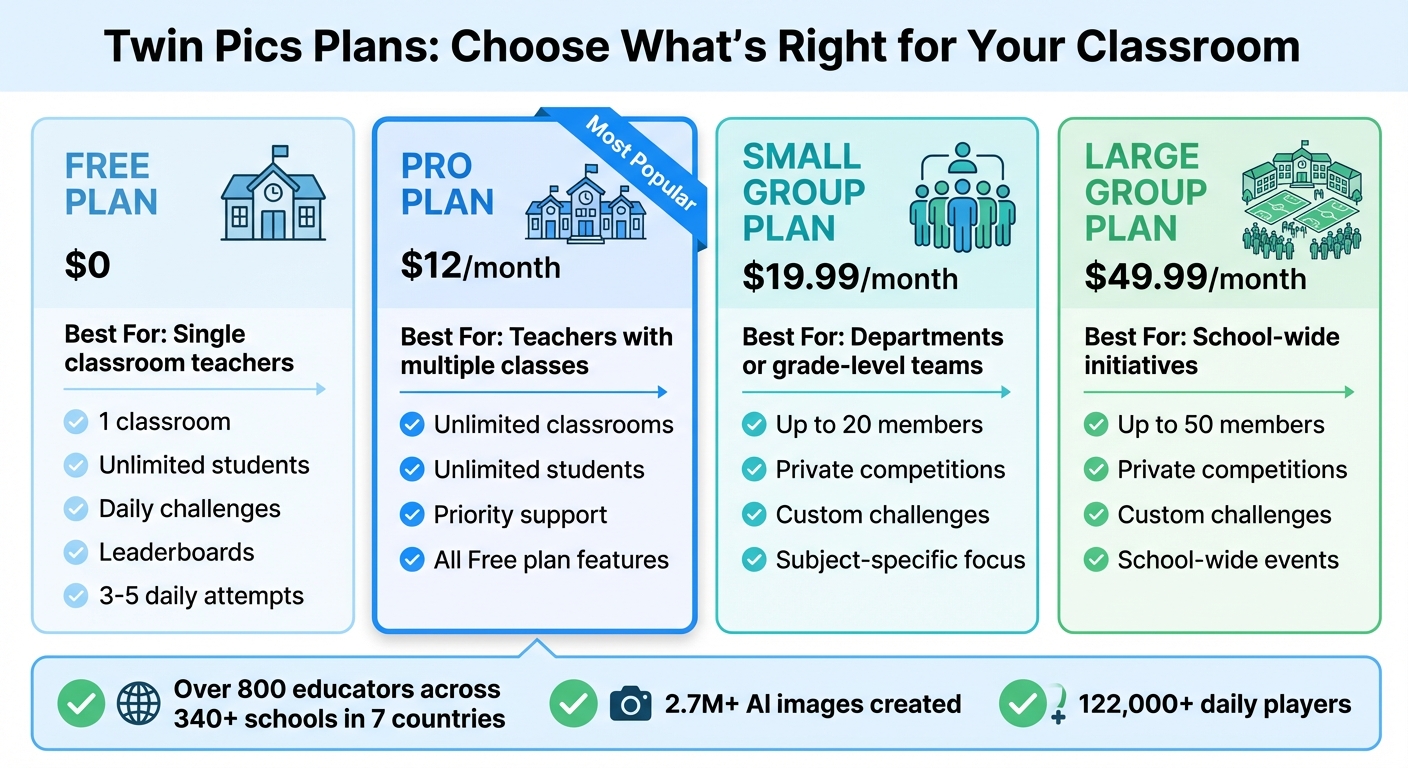
Twin Pics offers different plans tailored to meet the needs of individual teachers and larger educational groups. The Free plan is perfect for single classrooms, providing basic features like daily challenges, leaderboards, and unlimited students. However, for those managing multiple class periods, the Pro plan is a better fit. At just $12.00 per month, it includes unlimited classrooms and priority support, making it a great option for teachers juggling several groups of students.
If you're organizing school-wide events or subject-specific competitions, the Group Plans offer scalable solutions. The Small Group Plan, priced at $19.99 per month, supports up to 20 members, while the Large Group Plan at $49.99 per month accommodates up to 50 members. Both plans allow for private competitions and custom challenges tailored to specific subjects like ELA, art, or science. This ensures students only compete within their assigned groups, creating a more focused and relevant learning experience.
| Plan | Price | Best For | Key Features |
|---|---|---|---|
| Free | $0 | Single classroom teachers | 1 classroom, unlimited students, daily challenges, leaderboards |
| Pro | $12/mo | Teachers with multiple classes | Unlimited classrooms, priority support, all Free plan features |
| Group (Small) | $19.99/mo | Departments or grade-level teams | Up to 20 members, private competitions, custom challenges |
| Group (Large) | $49.99/mo | School-wide initiatives | Up to 50 members, private competitions, custom challenges |
Once you've settled on the plan that fits your needs, the next step is tracking your classroom's progress to measure success effectively.
Tracking Progress and Long-Term Impact
After selecting a plan, you can use Twin Pics' tools to monitor student engagement and growth. The classroom leaderboard provides real-time updates on participation and performance, with each student's score (ranging from 0 to 100) showing how closely their prompt-generated image matches the daily reference. This scoring system not only highlights individual achievements but also helps identify students who excel at creating effective prompts. These students can then share their strategies with peers, fostering a collaborative learning environment.
With over 800 educators across 340+ schools in seven countries using Twin Pics, the platform has proven effective in encouraging thoughtful and strategic prompt crafting. Even on the Free plan, the 3–5 daily attempt limit teaches students to focus on quality over quantity, helping them refine their skills while tracking progress over time.
Conclusion: Building AI Literacy in Your Students
Daily AI challenges transform abstract concepts into practical skills. For instance, when students craft a 100-character prompt and instantly receive a similarity score, they actively learn how to communicate their intent to machines. This immediate feedback underscores the importance of precision when working with AI - a skill that can shape their academic and professional journeys. This method has shown clear results in boosting both student engagement and skill development.
Over 800 educators have already made this platform part of their routines, demonstrating that fostering AI literacy doesn’t require elaborate lesson plans or costly tools. All it takes is five minutes a day and a browser.
You can create a free account and start your first challenge today. Whether it’s a bell ringer, a brain break, or an activity for fast finishers, these exercises nurture critical skills. Students improve their descriptive writing, learn to think critically about how AI interprets input, and gain awareness of ethical technology use - all while enjoying a friendly leaderboard competition.
The 100-character limit might seem restrictive, but it encourages precision and clarity. As Sakshi Dhingra from GeniusFirms remarked:
"Twin Pics lets students feel the difference between vague and precise language in seconds".
These quick, daily activities not only build technical skills but also prepare students for a world where understanding and working with AI is essential. Twin Pics offers a simple, COPPA-compliant way to start building that future today.
FAQs
What should I do if students don’t have 1:1 devices?
If students don’t have access to individual devices, you can shift the focus to group activities or use low-tech alternatives. For example, have students write prompts or descriptions on paper, then share and discuss their ideas as a class. You can also use tools like Twin Pics to introduce AI concepts by collaboratively generating images based on prompts created by students. These strategies allow for engaging AI literacy activities without requiring one device per student.
How do I grade or assess these daily AI challenges?
One way to evaluate daily AI challenges is by scoring outputs on three key factors: accuracy, creativity, and improvement. For instance, platforms like Twin Pics use scoring systems to measure how well a generated image aligns with a given reference.
You can also evaluate the clarity and creativity of prompts or descriptions. Look at how vivid and engaging they are while ensuring they meet the specified requirements. These methods offer clear and measurable ways to monitor both student progress and their level of engagement with the tasks.
How can I handle bias or inappropriate AI outputs in class?
To help students navigate bias or inappropriate AI outputs, encourage them to critically assess AI-generated content. For instance, ask them to pinpoint possible biases or inaccuracies in images or descriptions and discuss how these might reflect or influence societal norms.
You can also guide students in creating well-thought-out prompts, illustrating how specific wording can shape AI-generated results. These exercises not only sharpen critical thinking but also promote responsible AI usage, equipping students to identify and address biases effectively.