
10 Ways to Teach AI Literacy in the Classroom
10 Ways to Teach AI Literacy in the Classroom
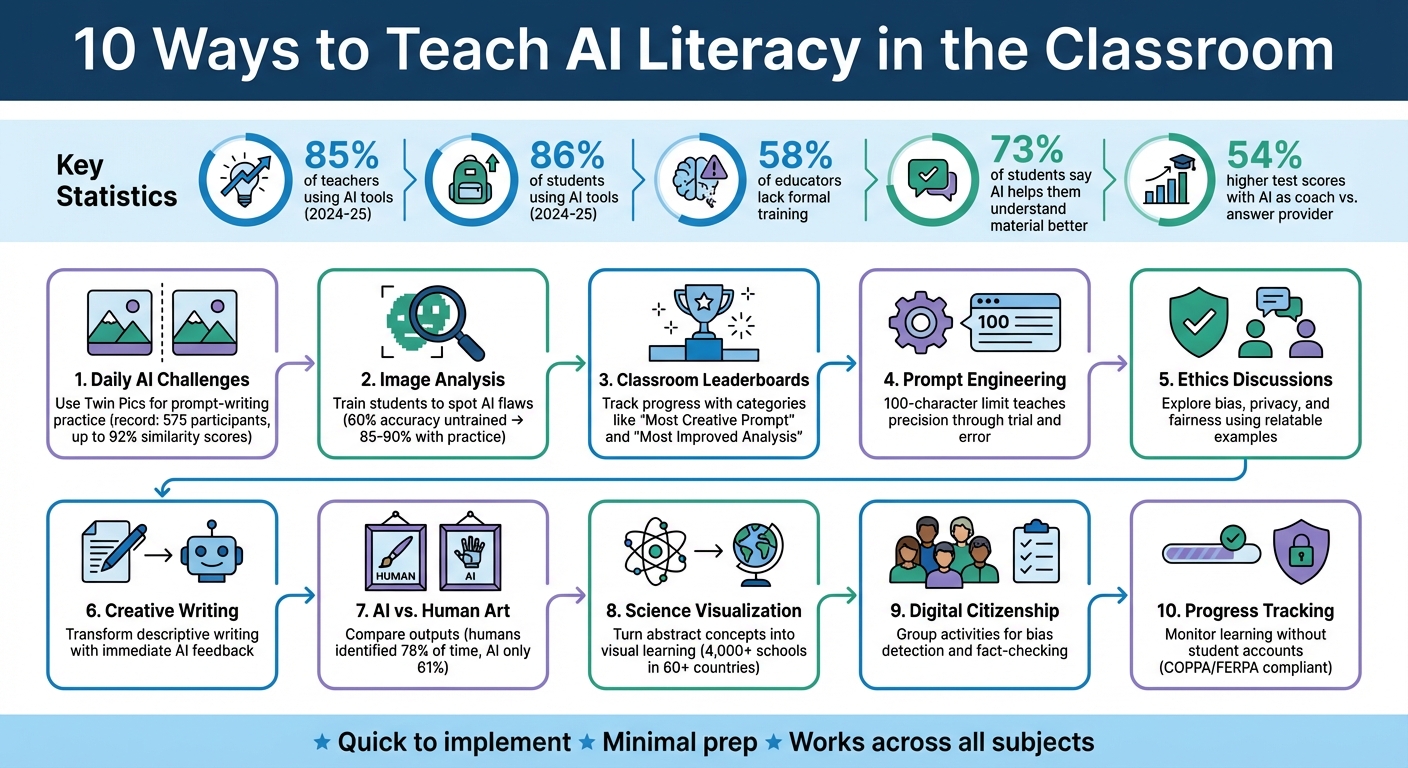
AI literacy is becoming as important as reading or math, and it's easier to teach than you might think. With 85% of teachers and 86% of students using AI tools during the 2024–25 school year, the need for AI education is clear. However, 58% of educators still lack formal training. This article outlines 10 simple ways to introduce AI concepts in your classroom, emphasizing critical thinking, ethics, and problem-solving.
Here’s a quick summary of the strategies:
- Daily AI Challenges: Use tools like Twin Pics to make prompt-writing fun and interactive.
- Image Analysis: Teach students to spot flaws and biases in AI-generated images.
- Classroom Leaderboards: Add friendly competition to keep students motivated.
- Prompt Engineering: Show how clear instructions improve AI outputs.
- Ethics Discussions: Explore topics like bias, privacy, and fairness using relatable examples.
- Creative Writing: Use AI tools to enhance storytelling and descriptive writing.
- AI vs. Human Art: Compare AI-generated visuals with human-created works.
- Science Visualization: Turn abstract concepts into visual learning moments.
- Digital Citizenship: Teach responsible AI use and bias detection.
- Progress Tracking: Monitor learning without requiring student accounts.
These activities are quick to implement, require minimal prep, and work across various subjects. Whether you're teaching elementary students or high schoolers, these methods can help them understand and navigate the growing role of AI in their lives.
10 Strategies for Teaching AI Literacy in the Classroom
Helping Students Understand AI in 2026
sbb-itb-97b6c2e
1. Use Twin Pics for Daily AI Image Generation Challenges
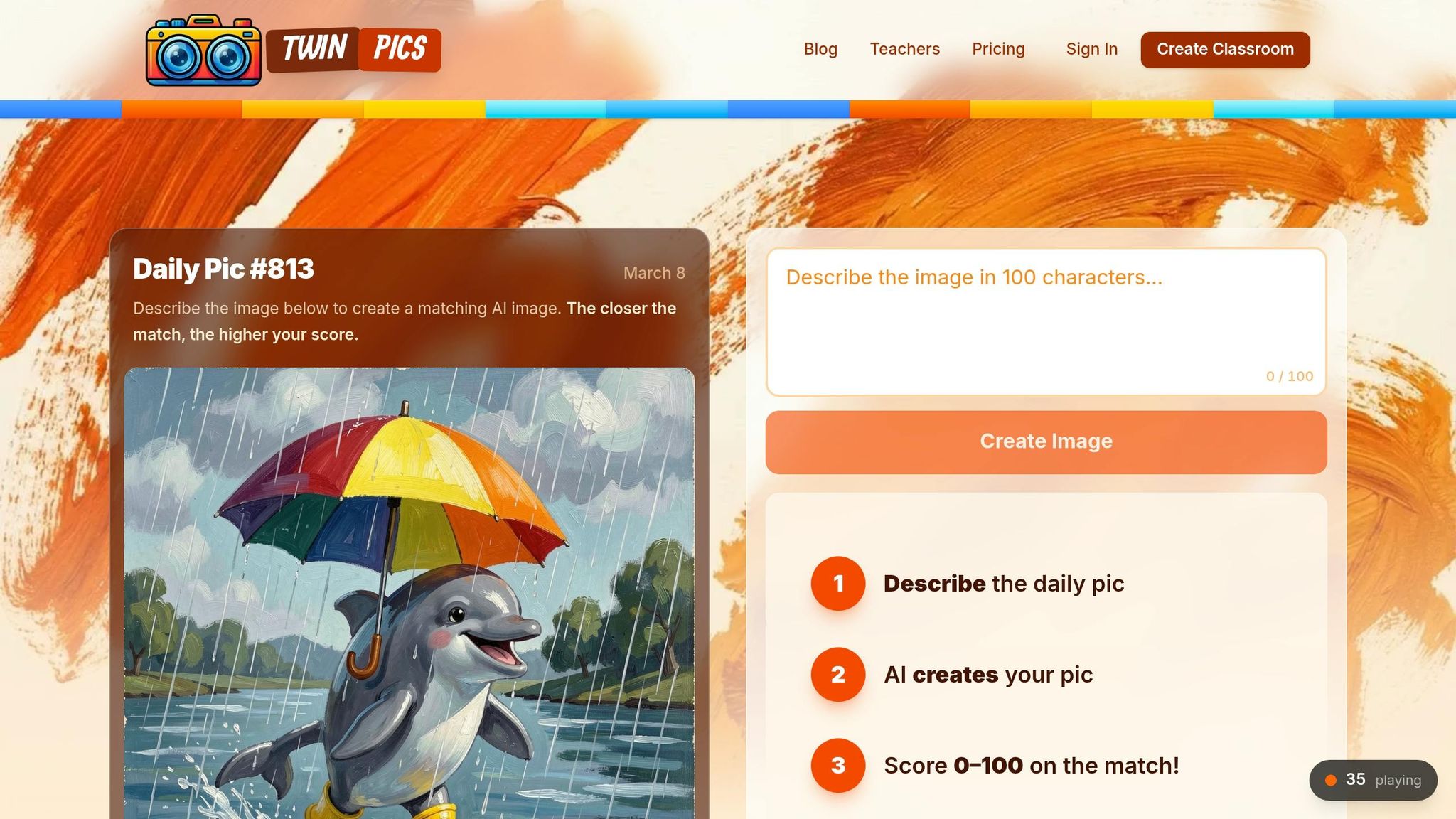
Twin Pics offers a quick, engaging visual puzzle where students recreate a target image using a text prompt capped at 100 characters. After submitting their prompt, the AI generates an image and provides a similarity percentage score to show how closely it matches the target image.
A new challenge image appears every 30 minutes, keeping the activity fresh and encouraging consistent practice. On June 14, 2025, the Twin Pics daily challenge hit a record of 575 participants in a single day, with some users achieving impressive similarity scores of up to 92%. This gamified setup makes prompt engineering fun and competitive, with results displayed on classroom and global leaderboards.
Use the daily challenge as a warm-up exercise. Start with a "bell ringer" by having students analyze the daily image before class. Ask them to identify specific visual details - such as lighting, style, subject placement, and color palette - before drafting their 100-character prompt. Educator Lidia from The Art of Inquiry highlights the importance of precision in this activity:
"Students learn quickly that adjectives matter, specificity matters, and that 'the cat on the left' is not nearly descriptive enough when there are two cats on the left in the image."
If devices are limited, try a collaborative approach. Have students write their prompts on paper, then randomly select one to test as a group. This allows everyone to see how AI responds to clear, detailed instructions and encourages thoughtful decision-making about which elements are most critical.
Twin Pics operates on a freemium model, offering basic features at no cost, making it accessible for any classroom.
2. Have Students Analyze AI-Generated Images
Once students are comfortable with creating images through daily challenges, the next step is to sharpen their critical thinking by analyzing AI-generated outputs. Instead of focusing solely on generating images, encourage them to evaluate and identify errors or inconsistencies in AI creations.
Start with a straightforward activity: present a mix of real photos and AI-generated images, and have students determine which are authentic. Interestingly, most people can correctly identify AI-generated images about 60% of the time without prior training. With practice, this accuracy can improve significantly, reaching 85–90%.
The GIANT Room's AI Guide for Educators emphasizes the value of such exercises:
"Examining these images demystifies AI and fosters critical use."
Draw attention to common flaws in AI images, such as extra or fused fingers, distorted text, inconsistent lighting or shadows, and unrealistic or "impossible" background details.
For a deeper understanding, challenge students to reverse-engineer an AI-generated image by deducing the prompt that may have created it. This helps them see how specific descriptive language influences the final output. Another engaging activity is to ask students to draw a "smart scientist" and then compare their sketches with an AI-generated depiction. This can lead to meaningful conversations about societal biases and how they manifest in AI systems.
Even adults familiar with AI sometimes struggle to spot AI-generated images. These exercises not only help students better understand AI but also equip them with essential digital discernment skills. Such foundational activities prepare them for more advanced explorations into AI and its impact on society.
3. Set Up Classroom Leaderboards for Friendly Competition
Leaderboards can transform routine activities into exciting challenges. With Twin Pics, you can use classroom and global leaderboards to track progress - no student accounts required. These leaderboards let students see how their AI image generation skills stack up against their peers.
Focus on celebrating the learning journey, not just the final results. Create leaderboard categories like "Most Creative Prompt", "Best Fact-Checker," or "Most Improved Analysis" to highlight a variety of accomplishments. This ensures every student has an opportunity to shine, whether they're refining their prompt-writing abilities or sharpening their critical thinking.
These custom categories encourage regular, engaging competitions. Research backs this up: 73% of students say AI technology helps them better understand learning material. Adding a competitive element can make learning even more engaging. As Jarvis Pace from SchoolAI explains:
"When students develop critical thinking skills around AI, they become empowered users rather than passive consumers."
Consider kicking off the week with "AI Moment Mondays", where students tackle a Twin Pics challenge, and the most imaginative results earn a spot on the leaderboard. Or introduce "Fact-Check Friday", where students compete to verify AI-generated claims quickly and accurately using reliable sources. These routines can spark enthusiasm and foster a deeper connection to the material.
4. Teach Prompt Engineering Through Trial and Error
Prompt engineering is all about crafting clear, concise instructions. Twin Pics makes this easier by capping prompts at 100 characters, encouraging students to focus on precision and word choice when guiding the AI. Here's how it works: students write a prompt, compare the AI-generated image to a target image, and instantly see a similarity percentage. This feedback shows what worked and what didn’t, creating a fun and straightforward way to learn through trial and error. Each attempt becomes a chance to improve.
If you’re working with limited devices, try whole-class modeling. Project the daily image and involve the entire class in creating a single prompt, or let individual students suggest prompts and pick one to test. Encourage students to refine their prompts step by step - for example, turning a vague "a cat" into something more specific like "a ginger tabby sitting on a blue rug." This hands-on approach not only builds confidence but also teaches students that clearer, more detailed prompts yield better results. Once they grasp the basics, they’ll be ready to tackle advanced AI image generation tools.
5. Discuss AI Ethics Using Classroom Examples
AI ethics can come to life through relatable, everyday scenarios. For younger students in K–2, you can introduce the concept of privacy by asking them to consider what’s safer to share: their favorite color or their home address. In grades 3–5, dive into data collection and bias by exploring examples like how search results for "doctor" and "nurse" might differ. Older students in middle and high school can tackle more nuanced topics, such as academic integrity - when does using AI cross the line into plagiarism? - and algorithmic bias in critical areas like loan approvals or facial recognition systems. These examples create a strong foundation for using tools like Twin Pics to visualize and discuss these issues.
Twin Pics offers a hands-on way to explore these concepts. Try the "Smart Scientist" activity: ask students to draw a "smart scientist" on paper, then use Twin Pics to generate an AI image of a "smart scientist." Compare the results. Do both the students’ drawings and the AI-generated images tend to favor certain genders, races, or ages? This exercise demonstrates how AI reflects patterns found in its training data - and sometimes, our own assumptions.
"AI models have been trained on the data we feed them. If the datasets being used to train AI models are biased, then the AI generated outputs will also be biased." - The GIANT Room
Take the discussion further by encouraging students to refine AI outputs for fairness. For example, if the prompt "a leader" generates only male images, challenge them to revise it to "a diverse group of world leaders" and compare the new results. Real-world examples can also drive the point home: a 2023 Bloomberg report revealed that an AI image generator predominantly depicted light-skinned individuals in high-paying jobs like lawyers, while darker-skinned individuals were shown in lower-paying roles, such as fast-food workers. Sharing these insights helps students see the importance of addressing AI bias beyond the classroom.
These activities not only deepen students' understanding of AI ethics but also position Twin Pics as a valuable tool for building AI literacy and fostering critical thinking.
6. Add Twin Pics to Creative Writing and Storytelling
Twin Pics transforms descriptive writing into an interactive challenge. Students craft 100-character prompts to describe a target image and receive an accuracy score based on their description. This immediate feedback highlights the importance of specific adjectives and precise language. For example, writing "the cat on the left" produces a different outcome than a more detailed description. It’s a creative way to merge visual art with narrative writing, opening the door to immersive storytelling.
"If concise writing were a competitive sport, Twin Pics would be the championship arena." - Lidia, The Art of Inquiry
Start with story-starter exercises by using Twin Pics' daily images as prompts. A new image appears every 30 minutes, providing fresh inspiration for students. Ask them to create a backstory or narrative based on the scene they see. For extended projects, students can describe a setting from their own drafts, generate it in Twin Pics, and then evaluate how well their descriptions matched the visual output. This process helps them identify areas where their writing could be more specific.
The 100-character limit forces students to carefully select their words. Even small tweaks to adjectives or verbs can significantly change the AI’s interpretation. This sharpens their creative writing and introduces them to the skill of crafting effective AI prompts. If devices are limited, turn this into a group activity. Have students write prompts on paper, test a few as a class, and discuss which worked best and why.
"Understanding how to write effective prompts using generative AI is an important skill, and Twin Pics is an engaging way to learn how to create a short prompt to create images." - TeachersFirst
To make classroom use smoother, remind students to copy their text before submitting it. This way, they can track their progress and refine their skills over time. Twin Pics also works well as a quick five-minute activity to kick off class, encouraging descriptive writing right from the start. By incorporating Twin Pics, educators not only enhance creative writing but also build AI literacy and communication skills.
7. Compare AI-Generated Images to Human-Created Art
Looking at AI-generated images alongside human-created art reveals a fascinating difference in how each is crafted. Human artists rely on personal experiences, emotions, and cultural influences, while AI generates images by analyzing patterns in its training data.
"While AI systems can generate visually appealing images by analyzing vast datasets and identifying patterns, human creativity remains distinguished by its ability to convey personal expression, cultural context, and deep emotional resonance." – Emmanuel Ok, Ladoke Akintola University of Technology
This contrast opens the door for interactive activities that help students explore these differences in depth.
One idea is to organize a "Real or AI?" challenge. A July 2025 study involving 161 participants showed that people correctly identified human-made images 78.03% of the time, but AI-generated images were only correctly spotted 61.08% of the time. Present students with a mix of images and encourage them to look for common AI traits like odd textures or distorted elements.
Another engaging activity is the "Smart Scientist" exercise. Students can compare their own drawings to images generated by Twin Pics, sparking discussions about representation and bias in AI creations. You might also introduce Ai-Da, a robot artist from Oxford whose works have been displayed internationally and even sold at major auctions. Asking whether a machine without emotions can truly be called an artist encourages deeper thinking about creativity and the value of art.
These activities not only highlight the differences between AI and human creativity but also position Twin Pics as a key tool for helping students develop both their understanding of AI and their creative skills.
8. Visualize Science Concepts with Twin Pics
Science concepts like molecular structures, space exploration, and ecosystems can often feel abstract and hard to grasp when presented in textbooks. Twin Pics changes that by turning these ideas into engaging visual challenges. With a strict 100-character limit, students must break down complex scientific concepts into concise descriptions - for example: "double helix DNA strand with colorful base pairs on a dark background". This approach connects theoretical science with visual, tangible feedback.
"Using AI-generated images opens the door to enhancing any classroom activity in many creative ways. Instead of searching endlessly for the perfect free image, create your own images from a personalized prompt." – Sharon Hall, Education Consultant
In March 2024, Twin Pics helped educators and students design an "eco-friendly school in Oslo" inspired by a fish tank. Students used prompts to describe sustainable features like shimmering glass walls and lush indoor greenery, turning abstract sustainability goals into vivid, visual representations. Similarly, in January 2023, Twin Pics supported STEM projects by visualizing "future versions" of student prototypes. For example, students imagined an ocean-cleaning robot equipped with AI sensors to detect underwater debris.
Twin Pics also introduces a similarity score, which measures how closely a generated image matches the intended concept. This instant feedback encourages students to refine their prompts. If their nebula or cell structure visualization doesn’t quite hit the mark, they can tweak their descriptions with specific adjectives like "microscopic," "cross-section," or "fluorescent." This trial-and-error process mimics AI training and deepens students’ understanding of how machines interpret language.
To make learning even more engaging, teachers can turn this into a competitive activity. Quick five-minute challenges, where students aim to achieve the highest similarity score while recreating scientific diagrams or phenomena, add an exciting layer to the classroom. Twin Pics is already making waves, with over 4,000 schools in more than 60 countries using it. Its daily challenge updates every 30 minutes, keeping the experience fresh and dynamic.
9. Teach Digital Citizenship Through Group Activities
Group activities can be a powerful way to help students grasp the principles of digital citizenship, especially when tied to AI ethics. Digital citizenship goes beyond online safety - it includes understanding how AI systems might mirror the values and biases of their creators.
Using tools like Twin Pics, students can engage in hands-on bias analysis. For example, divide the class into small teams and have them generate images based on prompts like "a smart scientist" or "a successful CEO." Then, guide them in creating simple charts to examine whether the results favor certain genders, races, or age groups. This visual approach makes abstract concepts about bias more tangible and easier to understand.
"AI literacy sits at the intersection of technical knowledge, critical thinking, and digital citizenship." – Laura Knight, Author
Once students have a foundation in identifying bias, you can introduce activities that push them to validate and debate AI outputs. For instance, implement a Fact-Check Friday routine where groups evaluate AI-generated responses using one reliable source. This practice reinforces critical thinking and promotes accuracy in assessing AI content.
Another engaging activity is the "Take a Stand" exercise, which works well for discussing controversial AI topics, like facial recognition technology. Present a scenario, such as "Should schools use facial recognition to track attendance?", and have students physically move to areas that represent their stance (e.g., agree, disagree, or neutral). Follow up with a discussion about the privacy implications and potential benefits. This setup helps students explore diverse viewpoints and recognize the ethical complexities of AI decisions.
To encourage accountability, establish a classroom norm where students document and share every prompt they use during Twin Pics challenges. This transparency allows for discussions about how specific word choices shape AI outputs, enabling educators to guide students toward more responsible and thoughtful use of AI tools.
10. Track Student Progress Without Requiring Accounts
Managing student accounts can be a headache, especially when privacy is a concern. Twin Pics simplifies this by allowing students to join classrooms using straightforward join codes - no need for email addresses, passwords, or personal information. This setup ensures compliance with COPPA and FERPA regulations while removing the hassle of account creation altogether.
The teacher dashboard acts as a real-time "Mission Control", offering a clear view of student activity on one screen. You can monitor participation, track prompt attempts, and review image comparisons without gathering personal data. This streamlined approach makes it easier to stay on top of engagement and provide immediate feedback.
For a more detailed record of student learning, encourage students to copy and paste their prompts into a shared document or their personal notebooks. This creates an "iteration path", which reveals how their ideas evolve from start to finish. By examining these records, you can evaluate their prompt engineering skills and critical thinking development. This process not only tracks progress but also supports formative assessment strategies discussed earlier.
This method aligns with expert recommendations for evaluating AI literacy in education.
"To assess AI literacy effectively, educators should prioritize application-based evaluations. As educators have done with digital literacy leveraging project-based assessments, showcase students' critical and creative thinking skills that are future-proof." – Jennifer Womble, Chair of the Future of Education Technology Conference
Wrap up each session with a quick five-minute "AI Weirdness" check, where students share any unexpected or inaccurate results they encountered. This activity offers valuable insights into how well students are analyzing AI outputs and understanding the tool's limitations, all while reinforcing formative assessment practices.
Conclusion
Teaching AI literacy doesn't require a complete curriculum overhaul or advanced technical expertise. The ten strategies shared here - like daily AI image challenges or progress tracking without accounts - offer practical, no-prep ways to bring AI education into your classroom. Even short sessions of 10–15 minutes can lay a solid groundwork for understanding today’s AI-driven world.
These activities encourage critical thinking by pushing students to evaluate AI outputs, boost creativity through innovative prompt design, and promote responsible digital habits by exploring issues like data privacy and bias. As Laura Knight, an educator and author, puts it:
"The emphasis is on improving thinking, not replacing it, so students remain active participants in the learning process."
These skills highlight how small, focused activities can effectively prepare students for an AI-powered future.
While AI use among educators and students is growing, surveys reveal a gap in formal training. Research also indicates that students in AI-supported active learning programs scored 54% higher on tests when AI acted as a coach rather than simply providing answers.
Adapt these strategies to suit your classroom. For younger students, try unplugged pattern recognition games. Middle schoolers might explore fact-checking or ethical debates, while high schoolers can dive into advanced prompt engineering. Tools like Twin Pics make it easy to adjust activities based on student readiness and the time you have available.
FAQs
What’s a simple way to explain AI to my students?
AI, or artificial intelligence, refers to machines or computers that learn by analyzing data and spotting patterns - kind of like how humans learn from experience. Imagine teaching a child how to recognize a dog. You'd show them pictures of dogs, point out their tails, fur, and floppy ears, and over time, they'd start identifying dogs on their own. AI works in a similar way, but instead of pictures, it processes massive amounts of data to "learn" and make decisions.
Let’s break it down with an example. Picture an algorithm as an actor preparing for a role. The script? It's the data it’s given. The actor studies the script, notices patterns, and uses those patterns to decide how to perform a scene. For instance, if the script says, “The character is sad,” the actor might frown or speak softly. Similarly, an AI algorithm processes its "script" - the data - and makes decisions based on what it has learned.
For a real-world example, think of how AI powers recommendation systems on Netflix. It learns from your viewing history, compares it to patterns in other users' data, and suggests movies or shows you might like. It’s not just a tool spitting out random suggestions - it’s actively identifying patterns to make decisions tailored to you.
This ability to learn and adapt makes AI more than just a piece of software. It’s a system designed to mimic human-like learning, helping us solve problems and make better decisions in countless areas of life.
How do I teach AI ethics in age-appropriate ways?
Teaching AI ethics can be made engaging and meaningful by centering activities around critical thinking and the responsible use of technology. For younger students, hands-on activities can be especially effective. For instance, they could train simple AI systems, which helps introduce concepts like fairness and privacy in a tangible way.
To deepen understanding, organize debates or collaborative exercises that tackle ethical dilemmas, such as how data is used or the impact of bias in AI systems. These discussions encourage students to think critically about the consequences of AI and explore potential solutions.
Finally, guide students to assess AI outputs with a critical eye. This not only builds their analytical skills but also fosters digital citizenship and a solid foundation in ethical decision-making.
How can I use Twin Pics if my class has limited devices?
Even if your classroom has limited devices, you can still make Twin Pics work by encouraging group collaboration. Have students team up in pairs or small groups to brainstorm, describe, and create images together. This approach not only reduces the number of devices needed but also fosters teamwork and shared learning.
You can also mix in offline, low-tech activities that tie into AI concepts. For example, try pattern recognition games or sorting exercises that complement what students learn with Twin Pics. These activities keep the learning experience engaging and accessible, even without a device for every student.