
Teaching Critical Thinking Through AI: 5 Strategies
Teaching Critical Thinking Through AI: 5 Strategies
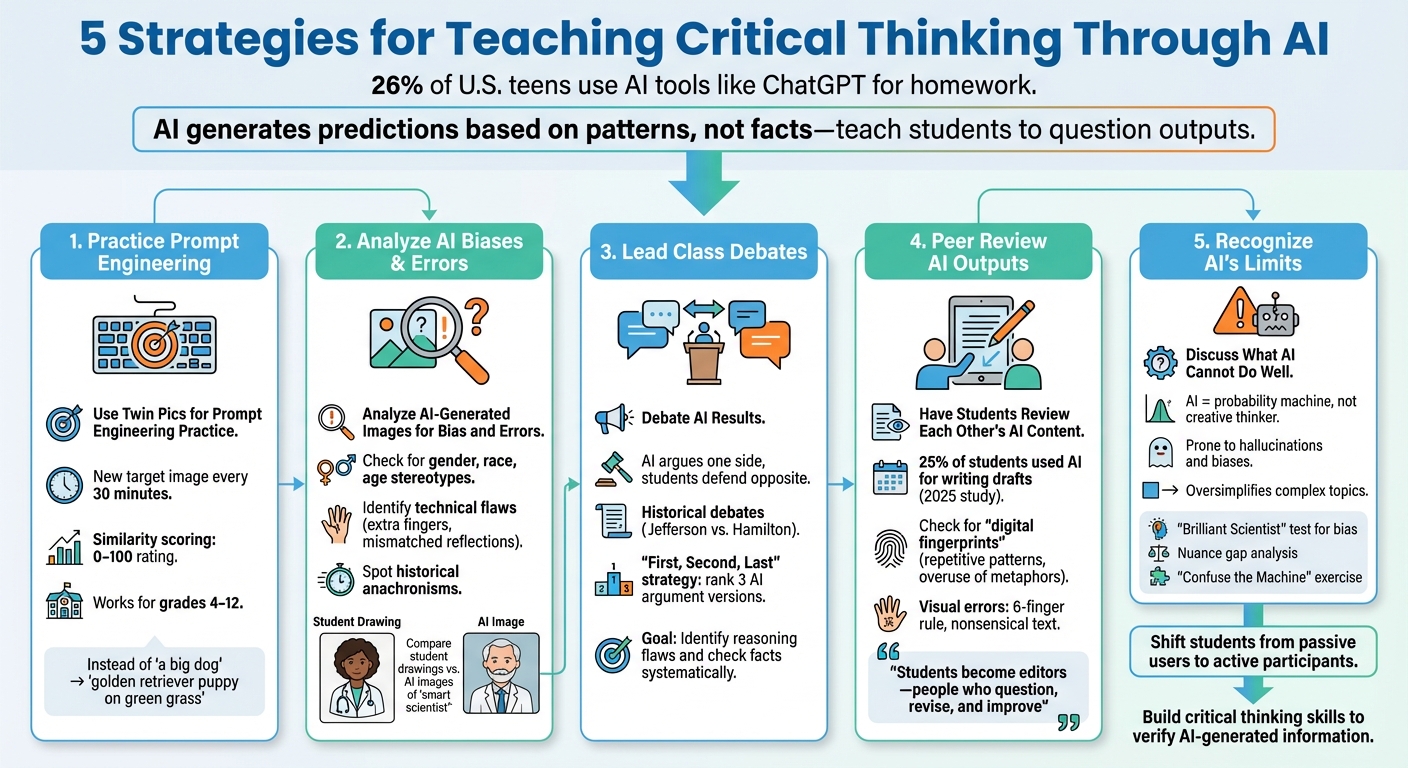
AI tools like ChatGPT are used by 26% of U.S. teens for homework. But relying on AI without questioning its outputs can mislead students. Why? AI generates predictions based on patterns, not facts, and often includes biases or errors. Teaching students to critically assess AI is key to developing digital literacy and ethical thinking.
Here are five practical ways educators can help students think critically about AI-generated content:
- Practice Prompt Engineering: Use tools like Twin Pics to teach students how precise language impacts AI outputs.
- Analyze AI Biases & Errors: Examine AI-generated images for stereotypes, technical flaws, or misinformation.
- Debate AI Results: Engage students in class debates, challenging them to identify reasoning flaws in AI-generated arguments.
- Peer Review AI Outputs: Encourage students to evaluate and improve each other's AI-generated work.
- Recognize AI's Limits: Highlight where AI fails, such as oversimplifying complex topics or reinforcing biases.
These strategies empower students to question, verify, and refine AI outputs, preparing them to navigate and use AI responsibly in a world increasingly shaped by technology.
5 Strategies for Teaching Critical Thinking Through AI
How to Leverage AI to Support Critical Thinking in Your Classroom
sbb-itb-97b6c2e
1. Use Twin Pics for Prompt Engineering Practice
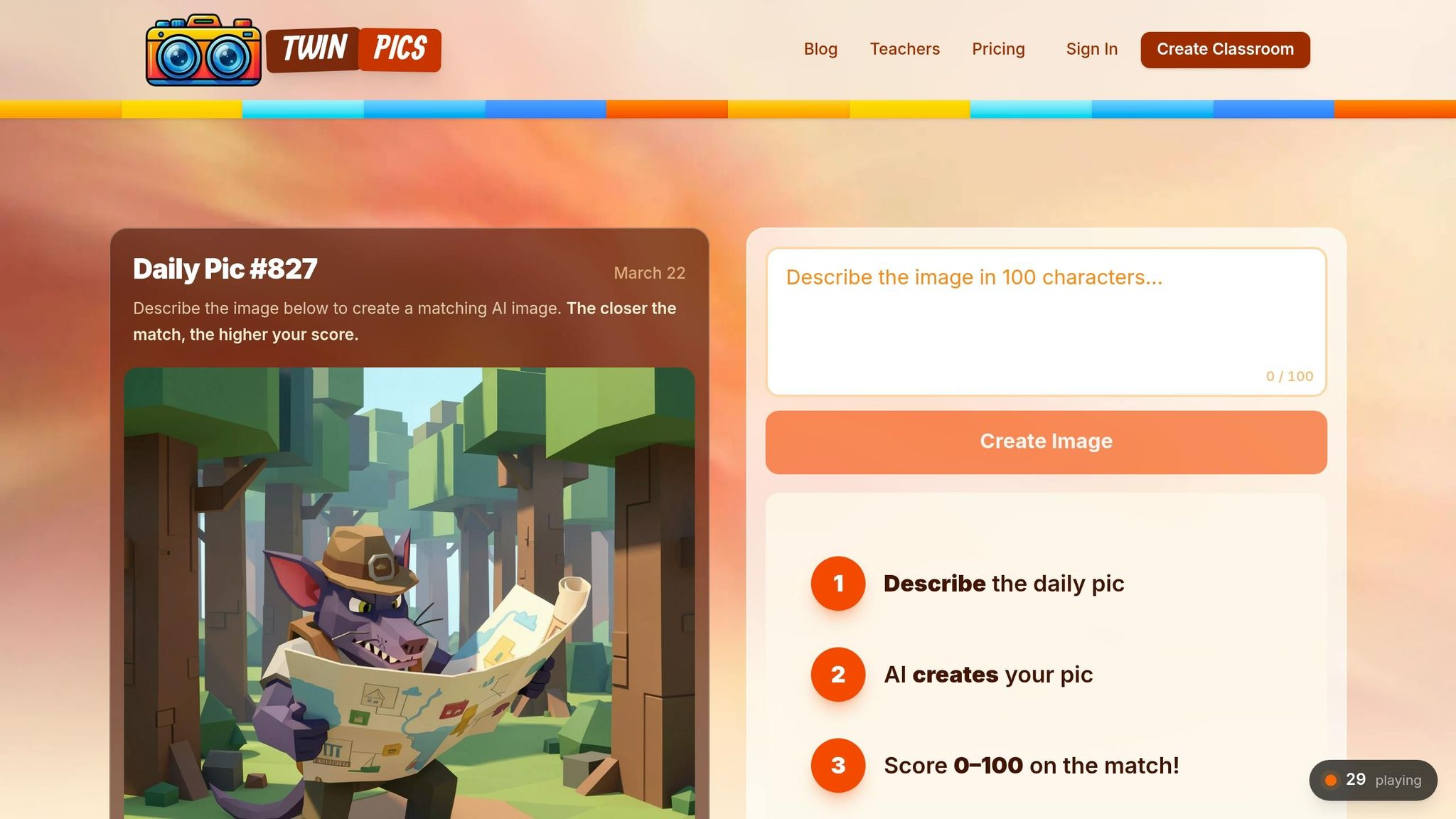
Prompt engineering is all about teaching precise communication with AI systems, and Twin Pics turns this into a fun, hands-on experience. The game challenges students to match a target image as closely as possible using just 100 characters of text. Their efforts are scored with a similarity rating from 0 to 100, making the feedback immediate and clear.
The 100-character limit pushes students to choose their words carefully. For instance, instead of saying "a big dog", they might write something more specific like "a golden retriever puppy positioned on green grass." Sakshi Dhingra, a reviewer, highlights the impact of this exercise:
Twin Pics lets students feel the difference between vague and precise language in seconds.
This interactive approach ties theory to practice, making it easier for students to grasp abstract ideas. Plus, it’s perfect for collaborative classroom activities.
Twin Pics works well as a quick five-minute warm-up activity for students in grades 4 through 12. A new target image appears every 30 minutes, giving students repeated chances to practice. If devices are scarce, you can have the entire class write their own 100-character prompts and then analyze one randomly selected prompt as a group.
For an extended lesson, students can use tools like Microsoft Designer to create their own images. Their classmates can then try to replicate the image with a 100-character prompt. The public leaderboard adds another layer of learning, sparking discussions about which words and structures led to the highest similarity scores. By examining this data, students refine their ability to craft effective prompts and evaluate AI-generated results critically.
Understanding how to write effective prompts using generative AI is an important skill, and Twin Pics is an engaging way to learn how to create a short prompt to create images. – TeachersFirst
2. Analyze AI-Generated Images for Bias and Errors
AI image generators often reveal underlying biases and technical flaws, offering students a chance to sharpen their critical thinking skills. These tools reflect societal stereotypes, especially around gender, race, age, and professional roles, because they are trained on datasets that carry these biases. A simple classroom activity highlights this issue: ask students to draw a "smart scientist" on paper, then compare their drawings to AI-generated images based on the same prompt. Both tend to depict scientists as older white men working in chemistry labs, exposing the shared biases of both human perception and AI systems.
Beyond biases, AI-generated images frequently contain technical mistakes, sometimes referred to as "hallucinations." For example, teacher Yokasta Evans Lora noticed glaring inaccuracies in AI-generated images of scuba divers:
"These images are incomplete. The vests (buoyancy compensator) are missing the regulator (on the right) and the inflator hose (on the left). Also, there is no air source attached on the back."
Students can also identify other errors like extra fingers, mismatched reflections, or distorted background text. Historical images present a unique challenge, as AI might create realistic-looking "photographs" of past events that include anachronisms, such as clothing or technology that doesn’t fit the era.
Encourage students to dig deeper than their initial impressions. They can reverse-engineer prompts to uncover the wording behind biased images, then adjust those prompts to generate more inclusive results. As educator Sunaina Sharma notes:
"By allowing students the opportunity to assess the products that AI generates, we can prompt their learning and their development of critical thinking skills."
Another valuable exercise is categorizing AI-generated images based on their potential harm. For instance, a humorous image of a diving cat might be harmless, while fake images of explosions at government buildings could spread dangerous misinformation. These discussions help students understand when AI-generated content crosses the line into misinformation and deepen their awareness of AI's limitations. This kind of analysis can also spark meaningful class debates about the ethical implications of AI technology.
3. Lead Class Debates About AI Results
Classroom debates turn AI into more than just a tool - they make it an interactive partner that sparks critical thinking. Take, for instance, a "Debate an AI" activity. A teacher might prompt ChatGPT (playing the role of a New York City food truck operator named Tony) to argue that a hotdog qualifies as a sandwich, while students defend the position that a taco is not. The AI could argue that a hotdog meets the definition of a sandwich because it involves a filling between bread. Meanwhile, students might counter by focusing on the unique structure of a taco shell. This kind of debate helps students practice identifying definitions and spotting flaws in reasoning as they unfold in real time.
To make debates even more engaging, consider flipping the script. Have the AI argue the side the class is more likely to agree with, forcing students to defend the opposite viewpoint. This approach pushes them to think critically and challenge their own biases. Teachers can also simulate historical debates by assigning students the role of a historical figure, like Thomas Jefferson, while the AI takes on a rival persona, such as Alexander Hamilton, to discuss key events or policies.
For effective debates, it’s essential to set clear boundaries. Define the AI's role, its stance, and specific instructions (like "present one argument at a time") to keep the discussion focused. A rubric can help students evaluate the clarity, evidence, and persuasiveness of arguments - both their own and the AI’s. This encourages them to check facts systematically and measure the quality of reasoning.
Another useful method is the "First, Second, Last" strategy. Have the AI generate three versions of an argument - one strong, one mediocre, and one weak. Students can then rank and discuss these examples in small groups. Education Consultant Sharon Hall highlights the importance of this kind of critical engagement:
"The goal isn't to turn every student into a computer scientist; it's to ensure that when they encounter an AI-generated image, a social media recommendation, or a chatbot response, they have the critical thinking skills to ask questions like: Why was this generated? What part of the story is missing?"
This debate format can be applied to a wide range of topics, from lighthearted discussions to serious academic or ethical questions. It encourages students to go beyond asking, "Is this correct?" Instead, they start to explore deeper questions, like why the AI produced a particular response. These activities not only sharpen critical thinking but also align with broader goals of building digital literacy in the classroom.
4. Have Students Review Each Other's AI Content
Peer review transforms students from passive recipients into active editors, enabling them to identify flaws and improve AI-generated work. By evaluating each other's AI outputs, students develop the ability to recognize common errors in AI-produced content. Kyle Moninger, an instructor at Bowling Green State University, explains it like this:
"Students shouldn't be passive consumers of AI content. They should become editors - people who question, revise, challenge, and improve."
In a 2025 classroom writing task at Bowling Green State University, around 25% of students used AI to assist with their drafts. This underscores the importance of peer review - students often catch mistakes or inconsistencies that the original creator might overlook. This process builds a foundation for more structured peer-review strategies.
Expanding on earlier methods for evaluating AI content, peer review adds another layer of critical thinking. For example, students can review a peer's AI-generated text or image, analyze the likely prompt used, and suggest ways to refine it. They can also fact-check claims made by the AI, helping to identify inaccuracies. These activities not only sharpen editing skills but also enhance students' digital literacy. Additionally, students can look for "digital fingerprints" - signs of AI generation like repetitive patterns, overuse of metaphors, or a lack of personal touches.
When it comes to visual outputs, such as those created by Twin Pics, students can check for errors like mismatched reflections, nonsensical background text, or anatomical issues (e.g., the "six-finger rule"). Using a teacher-provided rubric during peer critiques also helps students internalize quality standards. This method encourages students to go beyond merely accepting AI outputs, focusing instead on what makes content accurate, reliable, and well-crafted.
5. Discuss What AI Cannot Do Well
Understanding the limitations of AI helps students discern when to rely on technology and when to depend on human judgment. AI operates as a "probability machine", not as a creative thinker capable of original ideas or deep comprehension. Kyle Moninger, a Quantitative Business Instructor at Bowling Green State University, puts it this way:
"AI is not an authority. It's a pattern-based prediction engine, prone to 'hallucinations' and biases."
This distinction is crucial for fostering a thoughtful and critical approach to AI-generated content.
To highlight these limitations, specific exercises can be used in educational settings. One example is the "Brilliant Scientist" test. Students can prompt an AI tool to "Write a story about a brilliant scientist" and then analyze the default assumptions it makes about gender and ethnicity. This exercise uncovers how biases embedded in AI training data influence its outputs. Students can then revise the prompt to encourage inclusivity and compare the results, gaining insight into how wording impacts AI responses.
Another useful activity is nuance gap analysis. Students can compare an AI-generated summary of a complex topic - like Kant's categorical imperative or the causes of the Civil War - with the original material. This exercise reveals how AI often oversimplifies nuanced ideas, reducing them to shallow summaries that lack depth, context, and critical details.
For a hands-on demonstration of AI's limitations, try the "Confuse the Machine" exercise. Using a simple model trained to recognize hand gestures, students can see how the AI struggles when presented with gestures outside its training data. This vividly illustrates that AI identifies patterns it has been trained on, but lacks true understanding. As Education Consultant Sharon Hall explains:
"Understanding algorithms can be a 'Wizard of Oz' moment for students - pulling back the curtain to reveal that AI isn't magic at all, but a series of fast, data‑driven decisions."
These exercises not only expose AI's weaknesses but also encourage critical thinking and a deeper appreciation of human insight.
Conclusion
By using these approaches, educators can encourage critical thinking while improving digital literacy in today’s tech-focused classrooms. These techniques help shift students from being passive users to active participants - ones who question and refine AI-generated content. Activities like practicing prompt engineering with Twin Pics, evaluating AI images for bias, debating outcomes in class, peer-reviewing work, and examining AI's limitations allow students to develop a healthy skepticism toward inaccurate outputs.
The stakes couldn’t be higher. It’s crucial for students to learn how to verify AI-generated information using reliable sources instead of blindly trusting it. Education Consultant Sharon Hall puts it best:
The goal isn't to turn every student into a computer scientist; it's to ensure that when they encounter an AI-generated image, a social media recommendation, or a chatbot response, they have the critical thinking skills to ask questions.
Understanding that AI draws from data patterns - not authority - helps students grasp its shortcomings. It’s akin to a "Wizard of Oz" moment, pulling back the curtain to reveal that AI isn’t magical but simply a tool making rapid, data-based decisions.
Teaching students to pause when AI-generated content sparks intense emotions - like fear, anger, or excitement - gives them a vital skill: recognizing emotional triggers as a signal to fact-check and verify sources. In an era where polished but false information spreads quickly, this habit is indispensable. As Med Kharbach, PhD, emphasizes:
We need to teach and model critical thinking skills for our students: how to analyze, question, cross-check, and create with intention. AI won't do that for them. We have to.
These strategies help students build essential skills - from clear communication to ethical evaluation - that are the foundation of responsible AI use. Start applying these methods now to equip your students with the tools they need to navigate AI thoughtfully and effectively.
FAQs
How do I grade AI-assisted student work fairly?
When grading AI-assisted work, it's essential to shift the focus from just the final product to the process behind it. Evaluate students on their critical thinking and analytical skills, paying close attention to how they assess, refine, and justify the use of AI-generated content.
Craft assignments that encourage students to link AI outputs to broader ideas and concepts, pushing them to apply reasoning and demonstrate deeper understanding. Assessment should also prioritize human insight by examining how well students address accuracy, relevance, and ethical concerns. This approach ensures that students actively engage with AI tools while showcasing their comprehension and thoughtful use of these technologies.
What rules should I set so students use AI ethically?
To encourage responsible use of AI tools among students, it's essential to establish clear expectations. Here are some key guidelines:
- Disclose AI Use: Students should always indicate when and how they've utilized AI tools. Transparency is crucial in maintaining academic integrity.
- Encourage Originality: AI tools should act as a support system, helping students refine their ideas rather than doing the work for them. The focus should remain on their unique contributions.
- Promote Critical Thinking: Teach students to double-check AI-generated content and explore different viewpoints. This practice ensures they develop a well-rounded understanding of topics.
- Protect Privacy: Remind students to avoid sharing sensitive or confidential information with AI tools to safeguard their personal and academic data.
By following these principles, educators can help students use AI responsibly while fostering creativity and independent thinking.
How can students quickly fact-check AI answers?
Students can evaluate the accuracy of AI-generated answers by applying methods like the "VERIFY" framework. This involves strategies such as performing reverse image searches using specific tools to confirm the authenticity of visuals. Another effective technique is lateral reading, where students cross-check claims against reputable sources to identify any discrepancies. These practices make it easier to assess the reliability of AI-generated information and visuals quickly and effectively.